Google Ranking Dropped Suddenly? 15 Reasons & Recovery Checklist
Introduction
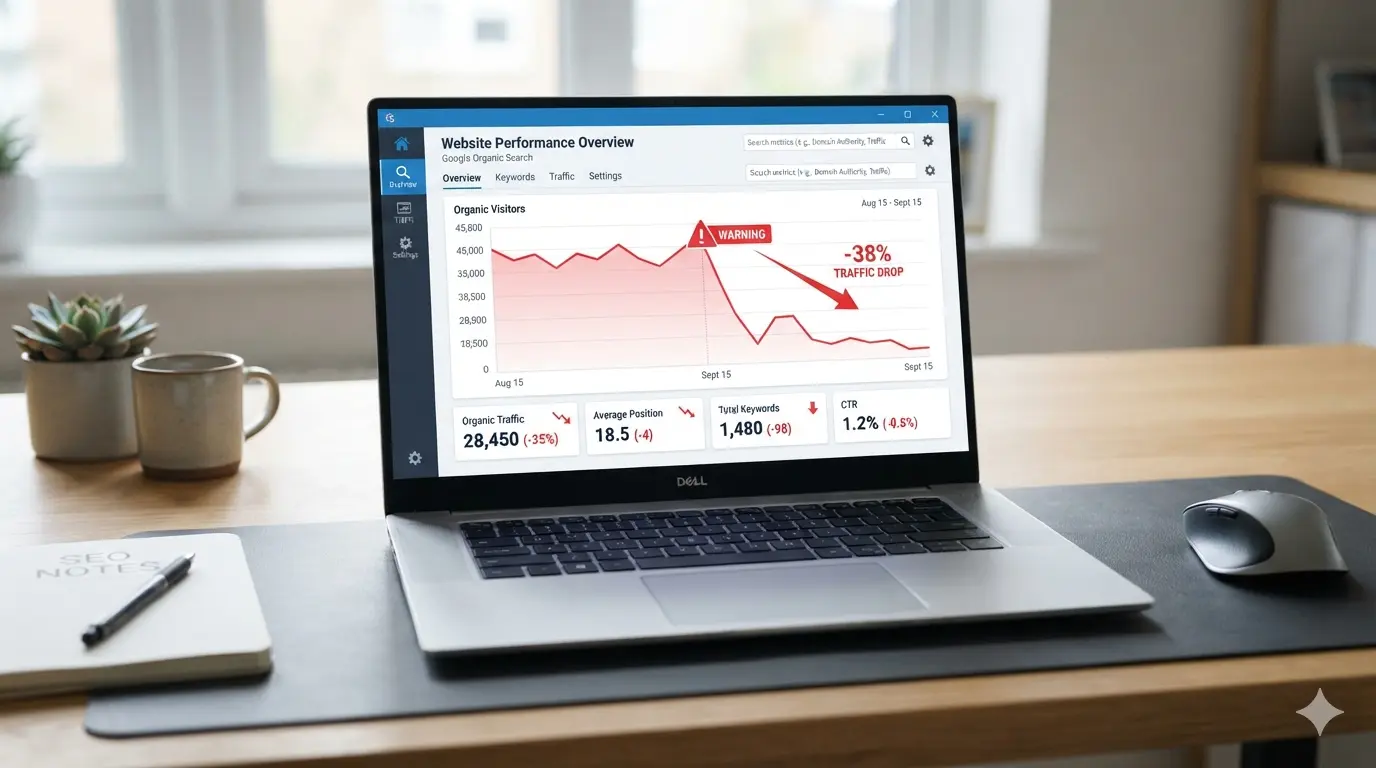
Has your Google ranking dropped suddenly? One day your page is getting clicks, leads, and impressions. A few days later, your keyword positions are down, organic traffic is lower, and you are wondering what went wrong.
A sudden ranking drop can feel serious, but it does not always mean your website has been penalized. Google rankings can drop because of algorithm updates, indexing issues, technical SEO errors, content quality problems, lost backlinks, competitor improvements, website redesigns, search intent changes, or even lower search demand.
Google explains that Search traffic drops can happen for several reasons, and website owners should use Search Console, Google Trends, and performance data to investigate the real cause before making changes.
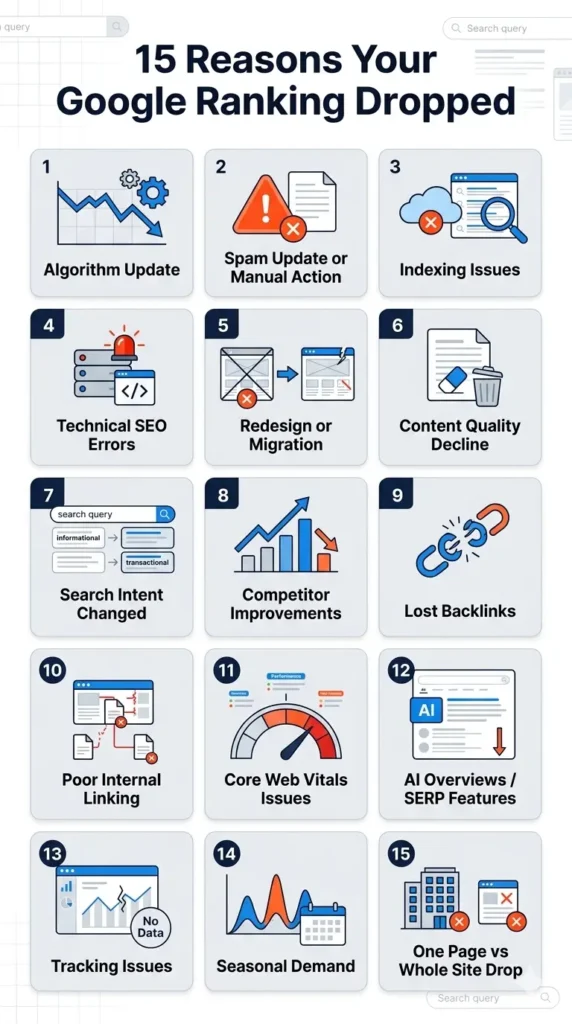
This guide explains why your Google ranking dropped suddenly, how to diagnose the issue, and what steps you can take to recover your lost SEO performance.
Has your website ranking dropped suddenly?
Get a complete SEO ranking drop audit before making random changes.
Google Ranking Dropped vs Website Traffic Dropped: What’s the Difference?
Before you fix anything, you need to understand whether your ranking dropped or your traffic dropped. These are not always the same thing.
Your ranking dropped when your page moved lower in Google results for important keywords. For example, your page may move from position 3 to position 12.
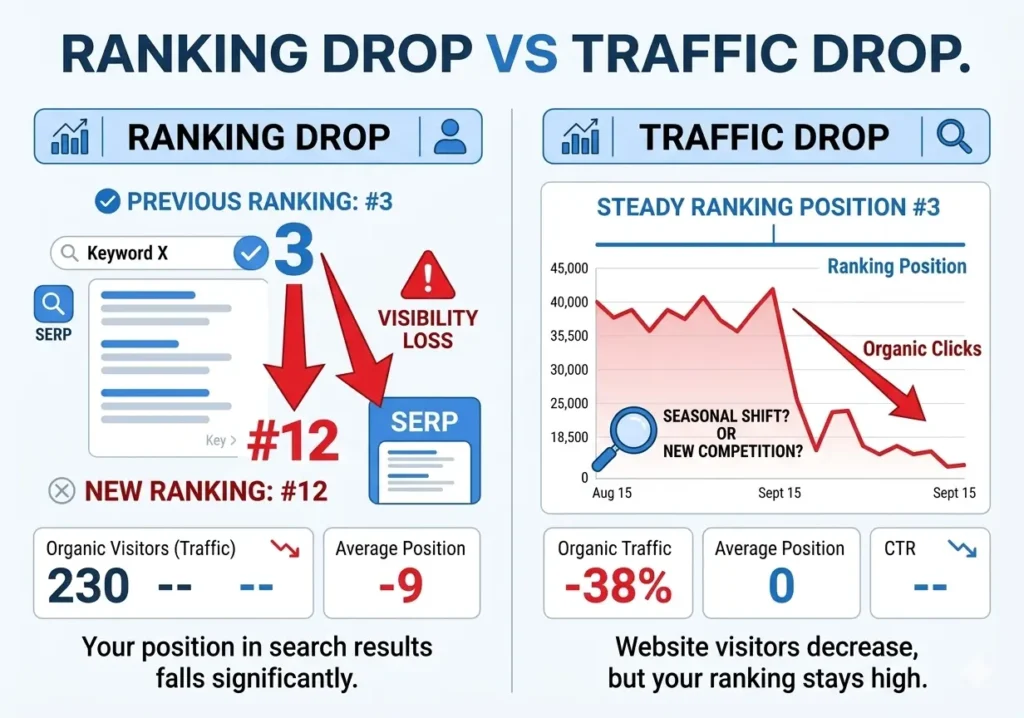
Your traffic dropped when fewer people clicked your website from Google. This can happen even if your rankings are stable.
For example:
- Your ranking may stay the same, but clicks drop because of AI Overviews.
- Your impressions may stay the same, but CTR drops because competitors have better titles.
- Your ranking may drop for one keyword but improve for another.
- Your traffic may drop because fewer people are searching for that topic.
- Your page may still rank, but new SERP features push organic results lower.
This is why you should not panic immediately. First, check whether the issue is a ranking drop, traffic drop, CTR drop, impression drop, or seasonal demand change.
1. Google Algorithm Update
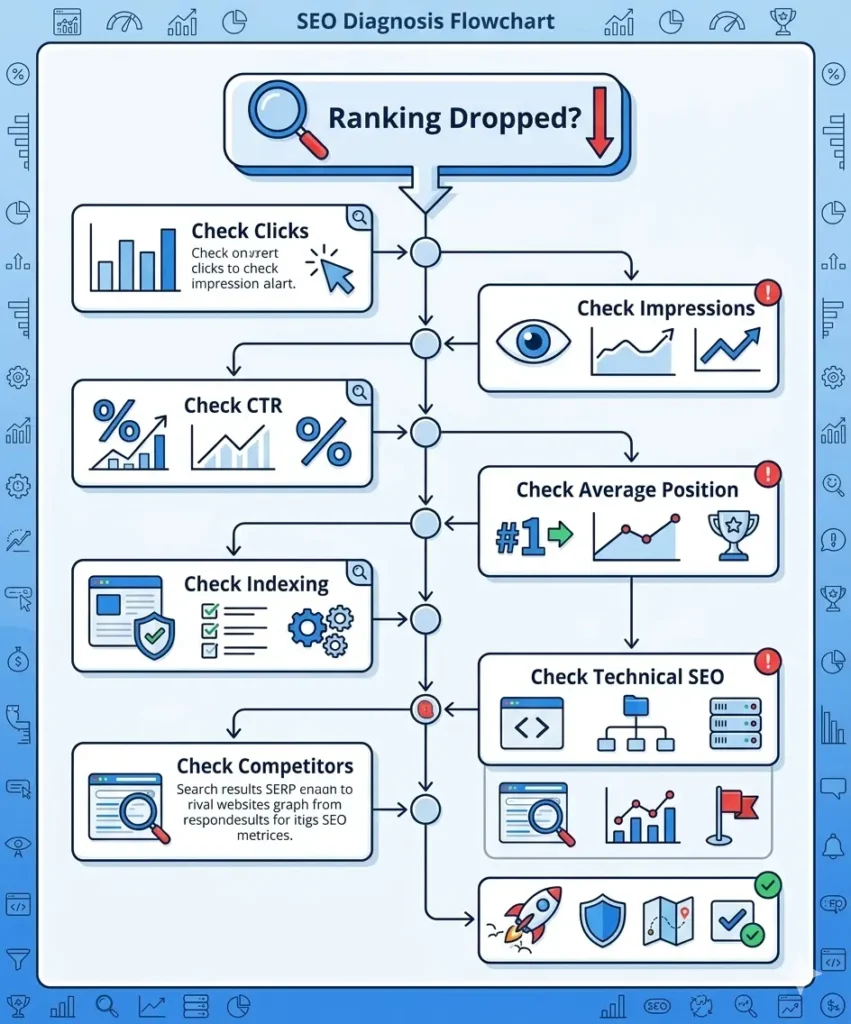
One of the most common reasons your Google rankings dropped is a Google algorithm update. Google regularly updates its ranking systems to improve search results and show more helpful content.
If your ranking drop happened around the same time as a core update or spam update, your website may have been affected. Google recommends checking the Search Status Dashboard, noting the start and end dates of the update, and waiting at least one full week after the update finishes before analyzing the impact in Search Console.
A Google core update does not always mean your website has done something wrong. Sometimes other pages become more helpful, more complete, or more relevant than yours.
What to check
Check if your drop started during or after a Google update. Then compare your top pages and queries before and after the update.
How to fix it
Improve content quality, update outdated sections, add missing information, strengthen E-E-A-T, and make your page more useful than competitors.
2. Google Spam Update or Manual Action
If your website uses spammy SEO tactics, your ranking can drop suddenly. This may happen because of a spam update or manual action.
Google’s spam policies cover practices such as cloaking, hidden text, keyword stuffing, link spam, hacked content, sneaky redirects, and other manipulative tactics.
What to check
Go to Google Search Console and check:
- Manual Actions
- Security Issues
- Sudden loss of indexed pages
- Spammy backlinks
- Hacked URLs indexed in Google
How to fix it
Remove spammy content, clean hacked pages, disavow only harmful links when necessary, and submit a reconsideration request if you received a manual action.
3. Indexing Issues
If Google removes your page from the index, your ranking can disappear quickly. This is one of the most serious causes of a website ranking dropped suddenly issue.
Your page may not rank because it is:
- Blocked by robots.txt
- Marked noindex
- Canonicalized to another page
- Returning a 404 error
- Redirected incorrectly
- Crawled but not indexed
- Discovered but not indexed
What to check
Use the URL Inspection tool in Search Console. Check whether the page is indexed, crawlable, and selected as the canonical version.
How to fix it
Remove accidental noindex tags, fix robots.txt blocks, correct canonical tags, repair broken URLs, and resubmit the page for indexing.
4. Technical SEO Errors
A technical SEO issue can cause a sudden SEO ranking drop, especially after a website update, plugin change, migration, or redesign.
Common technical problems include:
- Broken internal links
- Redirect chains
- 5xx server errors
- Slow loading pages
- Mobile usability problems
- Incorrect canonical tags
- Duplicate pages
- JavaScript rendering issues
- Missing structured data
- Sitemap errors
Google’s Search Central documentation highlights that technical problems can affect crawling, indexing, and serving in Search.
What to check
Run a technical SEO crawl using Screaming Frog, Sitebulb, Ahrefs, Semrush, or SE Ranking. Also check Search Console for indexing, crawl, and page experience issues.
How to fix it
Fix broken links, improve page speed, correct redirects, update sitemaps, repair canonical tags, and make sure important pages are crawlable.
5. Ranking Drop After Website Redesign or Migration
A ranking drop after a redesign or migration is very common. Even if the new website looks better, rankings can fall if SEO elements were changed or removed.
This can happen when:
- URLs are changed without proper redirects
- Title tags are rewritten badly
- H1 headings are removed
- Content is shortened
- Internal links are removed
- Schema markup is deleted
- Page speed becomes worse
- Important pages are not included in the sitemap
What to check
Compare the old and new versions of your website. Review URLs, titles, headings, content, internal links, redirects, canonicals, and schema.
How to fix it
Restore missing SEO content, fix 301 redirects, recover lost internal links, update sitemap URLs, and check every high-value page in Search Console.
6. Content Quality Decline
Google’s ranking systems are designed to reward helpful, reliable, people-first content rather than content created mainly to manipulate search rankings.
Your page may drop if the content is outdated, thin, generic, over-optimized, or less useful than competing pages.
What to check
Compare your page with the current top 5 competitors. Look at:
- Content depth
- Freshness
- Examples
- Expert insight
- User intent match
- FAQs
- Visuals
- Trust signals
- Internal links
- Author information
How to fix it
Update outdated information, add original examples, improve structure, answer missing questions, remove fluff, and make the content more practical.
7. Search Intent Changed
Sometimes your keyword ranking drop happens because Google’s understanding of the search intent has changed.
For example, a keyword that used to show blog posts may now show product pages, local results, tools, videos, or comparison guides.
What to check
Search your main keyword manually and study the top-ranking pages. Are they blogs, service pages, product pages, category pages, videos, or tools?
How to fix it
Adjust your page to match the current intent. If Google prefers a checklist, add a checklist. If it prefers a service page, create a stronger commercial page. If it prefers tools, add a calculator, template, or downloadable resource.
8. Competitors Improved Their SEO
Your ranking may drop because your competitors improved their pages. Google rankings are relative. If another page becomes better, your page can move down.
Competitors may have:
- Updated their content
- Built better backlinks
- Added FAQs
- Improved page speed
- Added expert quotes
- Improved internal linking
- Matched search intent better
- Added original data or visuals
What to check
Review the pages now ranking above you. Look for what they cover that your page does not.
Get Free SEO Audit of Your site
How to fix it
Create a better version of your page. Do not copy competitors. Add more value, clearer answers, better structure, and stronger trust signals.
9. Lost Backlinks
Backlinks are still important in competitive SEO. If your page lost high-quality backlinks, rankings may drop.
What to check
Use Ahrefs, Semrush, Moz, or Search Console to check:
- Lost backlinks
- Lost referring domains
- Lost homepage links
- Lost links to important pages
- Spammy backlink spikes
How to fix it
Recover lost links where possible, build new relevant links, strengthen internal links, and create link-worthy content such as guides, templates, statistics, and tools.
10. Poor Internal Linking
Internal links help Google understand which pages are important. If internal links were removed or weakened, rankings can drop.
What to check
Check whether your dropped page still receives links from important pages like the homepage, service pages, category pages, or related blog posts.
How to fix it
Add contextual internal links using natural anchor text. Link from high-authority pages to your dropped page.
11. Page Experience and Core Web Vitals Issues
Page experience can affect SEO performance, especially when users have a poor experience. Google recommends site owners achieve good Core Web Vitals for Search success and better user experience.
What to check
Check:
- Largest Contentful Paint
- Interaction to Next Paint
- Cumulative Layout Shift
- Mobile usability
- Intrusive popups
- Slow server response
How to fix it
Compress images, improve hosting, remove unnecessary scripts, use caching, optimize fonts, and improve mobile layout.
12. SERP Features and AI Overviews Reduced Clicks
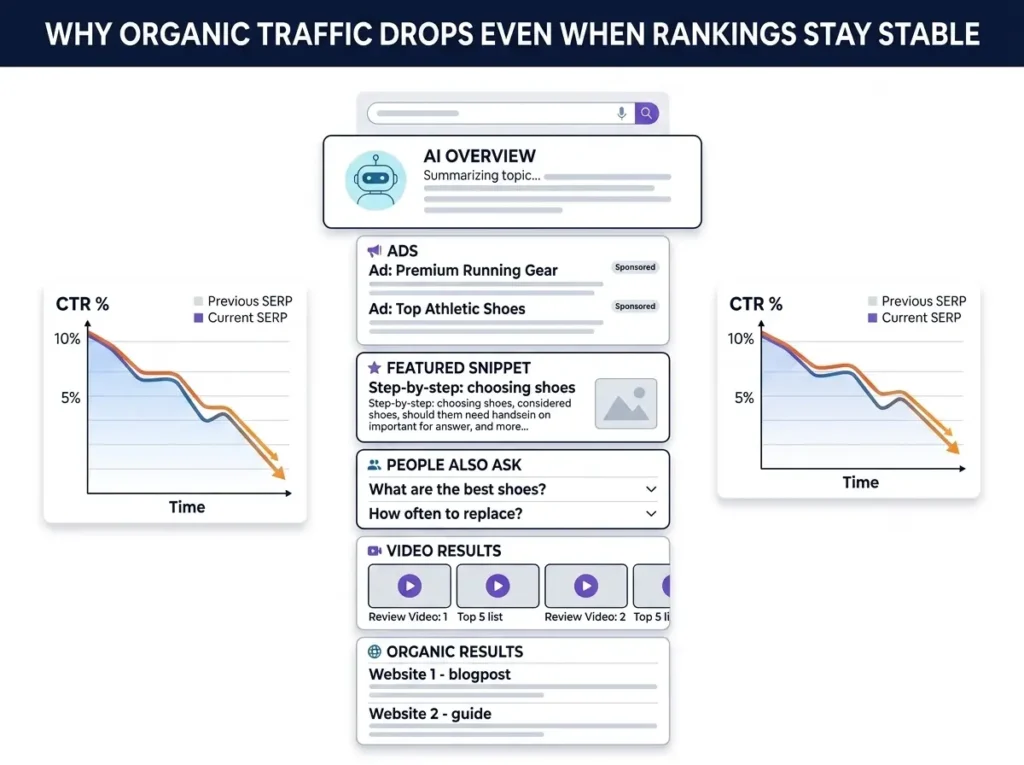
In 2026, some websites may see rankings up but traffic down. This can happen because of AI Overviews, featured snippets, People Also Ask, videos, ads, local packs, and other SERP features.
Google also introduced dedicated Search Console reporting for generative AI features, which shows that AI visibility is becoming a separate area to monitor.
This means your ranking may not be the only problem. Your page may still appear in Google, but fewer users may click because the answer is shown directly on the results page.
What to check
In Search Console, compare:
- Impressions
- Clicks
- CTR
- Average position
- Search appearance
- Query-level data
If impressions are stable but clicks dropped, the issue may be CTR, SERP features, or AI Overview visibility.
How to fix it
Improve your title tags, add stronger meta descriptions, answer queries clearly, use schema markup, add unique insights, and optimize for both traditional SEO and AI search visibility.
13. Tracking or Analytics Issues
Sometimes rankings did not actually drop. Your tracking may be broken.
This can happen after:
- GA4 tag changes
- Google Tag Manager changes
- Cookie banner updates
- Theme updates
- Plugin conflicts
- Wrong Search Console property selection
- Incorrect date comparison
What to check
Compare Google Search Console data with GA4 organic traffic. If Search Console clicks are stable but GA4 traffic dropped, your analytics tracking may be wrong.
How to fix it
Check GA4, Google Tag Manager, conversion tags, consent mode, and tracking scripts.
14. Seasonal Search Demand
A drop in organic traffic does not always mean an SEO problem. Some topics naturally rise and fall based on season, trends, events, or customer demand.
Google recommends using Google Trends and Search Console to understand whether the drop is related to changing search demand.
What to check
Search your main keyword in Google Trends. Compare the current period with the same period last year.
How to fix it
Create seasonal content early, update important pages before demand increases, and target related evergreen keywords.
15. One Page Dropped vs Whole Site Dropped
You need to know whether the ranking drop affected one page or the full website.
If one page dropped
The issue may be:
- Content quality
- Search intent
- Lost backlinks
- Competitor improvement
- Page-level indexing issue
- Internal linking weakness
If the whole site dropped
The issue may be:
- Algorithm update
- Manual action
- Technical SEO problem
- Hosting issue
- Site-wide noindex
- Migration mistake
- Security problem
How to fix it
In Search Console, open the Performance report and compare pages. Sort by clicks lost. If many pages dropped at the same time, investigate site-wide issues first.
Free_Google_Ranking_Drop_Audit_Checklist
How to Check Lost Queries in Google Search Console
Google Search Console is the best starting point for diagnosing a Google Search Console ranking drop.
Follow these steps:
- Open Google Search Console.
- Go to Performance.
- Set the date range to compare the drop period with the previous period.
- Click Queries.
- Sort by clicks difference.
- Identify which keywords lost the most clicks.
- Click each query and check affected pages.
- Compare average position, impressions, and CTR.
- Check whether the ranking dropped or only clicks dropped.
- Export the data for deeper analysis.
If average position dropped, it is likely a ranking issue. If position is stable but CTR dropped, it may be a SERP or title/meta issue. If impressions dropped, it may be an indexing, demand, or relevance issue.
Emergency 30-Minute SEO Ranking Drop Checklist
Use this quick checklist when your Google ranking dropped suddenly.
First 5 minutes
- Check if the drop is real.
- Compare Search Console and GA4.
- Confirm the correct date range.
- Check if one page or the full site dropped.
Next 10 minutes
- Inspect the affected URL in Search Console.
- Check indexing status.
- Check robots.txt.
- Check noindex tags.
- Check canonical tags.
- Check if the page returns 200 status.
Next 10 minutes
- Check recent Google updates.
- Review recent website changes.
- Check lost backlinks.
- Check manual actions.
- Check security issues.
Final 5 minutes
- Search the main keyword manually.
- Compare your page with competitors.
- Check if AI Overviews or SERP features reduced clicks.
- Create a recovery action list.
Google Ranking Recovery Plan
Once you know the cause, use this recovery plan.
Step 1: Identify affected pages
Find the pages that lost the most clicks, impressions, or rankings.
Step 2: Diagnose the reason
Check whether the cause is technical, content-related, algorithmic, backlink-related, competitor-related, or tracking-related.
Step 3: Fix technical issues first
Technical problems should be fixed before content updates because Google may not properly crawl or index your page.
Step 4: Improve content quality
Add missing information, update old data, improve readability, add FAQs, include examples, and make the page more helpful.
Step 5: Strengthen internal links
Add internal links from relevant high-authority pages.
Step 6: Improve CTR
Rewrite weak title tags and meta descriptions. Make them clear, benefit-focused, and relevant to the search query.
Step 7: Monitor weekly
Track clicks, impressions, CTR, and average position every week. Do not make unnecessary changes every day.
Free SEO Ranking Drop Audit Template
Use this simple template to diagnose the issue.
| Check | Status | Notes |
|---|---|---|
| Did rankings drop or only traffic? | ||
| Is the issue page-specific or site-wide? | ||
| Did impressions drop? | ||
| Did CTR drop? | ||
| Did average position drop? | ||
| Is the page indexed? | ||
| Is the page blocked by robots.txt? | ||
| Is there a noindex tag? | ||
| Is the canonical correct? | ||
| Were URLs changed recently? | ||
| Did a Google update happen? | ||
| Did competitors improve? | ||
| Were backlinks lost? | ||
| Did search intent change? | ||
| Are AI Overviews affecting clicks? | ||
| Are GA4/GTM tags working? |
What Not to Do After a Google Ranking Drop
Avoid these mistakes:
- Do not rewrite every page without data.
- Do not delete pages immediately.
- Do not change URLs unless necessary.
- Do not build spammy backlinks.
- Do not stuff keywords.
- Do not copy competitors.
- Do not ignore Search Console warnings.
- Do not blame Google before checking your own website.
- Do not make too many changes at once.
A ranking drop needs diagnosis, not panic.
Final Thoughts
If your Google ranking dropped suddenly, the first step is to understand what actually changed. A drop may come from algorithm updates, indexing errors, technical SEO problems, content quality issues, lost backlinks, competitors, AI Overviews, or tracking problems.
Start with Google Search Console. Check whether clicks, impressions, CTR, or average position changed. Then inspect affected pages, compare competitors, review recent site changes, and build a focused recovery plan.
The best way to recover lost rankings is to improve the page for users, fix technical issues, strengthen trust, and make your content more helpful than competing results.
FAQs
Why did my Google ranking drop suddenly?
Your Google ranking may drop suddenly because of a Google update, technical SEO issue, indexing problem, content quality decline, lost backlinks, competitor improvement, search intent change, manual action, or tracking issue.
How do I check why my website ranking dropped?
Use Google Search Console. Compare the drop period with the previous period, check affected pages and queries, inspect URLs, review indexing status, and compare clicks, impressions, CTR, and average position.
Can rankings drop even if my SEO is good?
Yes. Rankings can drop if competitors improve, search intent changes, Google updates its systems, or SERP features reduce clicks.
How long does it take to recover Google rankings?
Recovery can take days, weeks, or months depending on the issue. Technical fixes may recover faster, while content quality or core update recovery can take longer.
What should I do first after a ranking drop?
First, confirm whether rankings actually dropped. Then check Google Search Console, indexing status, manual actions, recent website changes, and Google update dates.
Why are my rankings up but traffic down?
This can happen because of lower CTR, AI Overviews, featured snippets, ads, local packs, zero-click searches, or lower search demand.
Can a website redesign cause ranking drops?
Yes. A redesign can cause ranking drops if URLs, headings, content, internal links, schema, titles, or redirects are changed incorrectly.
How do I recover lost Google rankings?
Fix technical issues, improve content quality, match search intent, strengthen internal links, recover lost backlinks, improve CTR, and monitor Search Console data weekly.