How to Update Old Blog Posts for SEO: A Complete Content Refresh Checklist
If your blog traffic is flat or declining, publishing new articles is not always the best next move. Sometimes the fastest SEO win is learning how to update old blog posts for SEO.
Old blog posts may already have search impressions, backlinks, internal links, social shares, and some level of topical authority. That means you are not starting from zero. You are improving an existing asset.
This guide gives you a practical old blog post SEO checklist to help you choose the right posts, refresh outdated content, protect existing rankings, and measure results after republishing.
Want us to refresh your old blog posts for SEO?
What Does It Mean to Update Old Blog Posts for SEO?
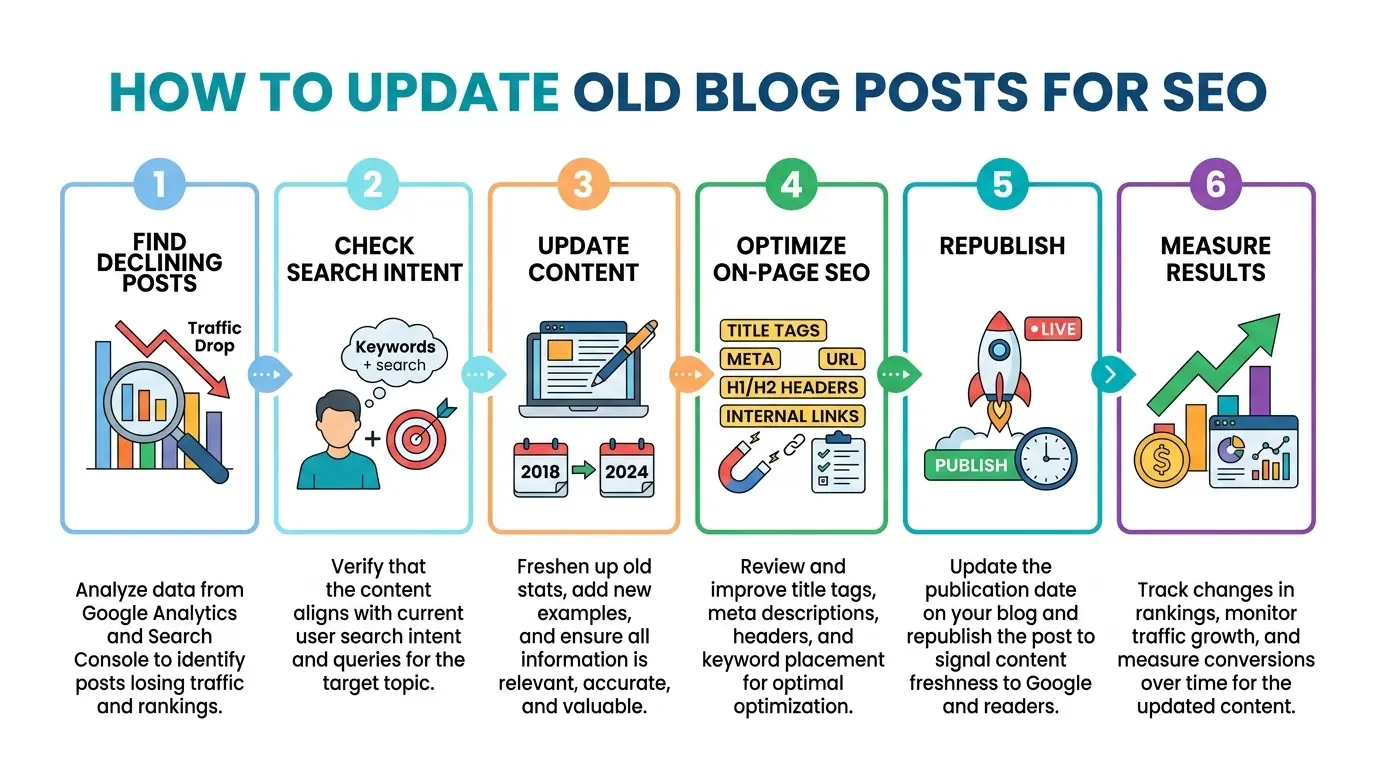
To update old blog posts for SEO means improving an existing article so it becomes more accurate, useful, complete, and aligned with current search intent.
A proper update may include:
- Rechecking the target keyword
- Updating outdated facts, dates, screenshots, tools, pricing, or statistics
- Improving the title tag and meta description
- Adding missing sections based on current SERP intent
- Improving internal links
- Fixing broken external links
- Adding better visuals
- Improving readability
- Adding FAQs
- Refreshing the call to action
- Requesting reindexing in Google Search Console
A content update is not just changing the publish date. Google warns against changing dates to make pages seem fresh when the content itself has not substantially changed. Google also says helpful content should be created for people first, not mainly to manipulate rankings.
That means your goal is simple: make the page genuinely better for the searcher.
Why Updating Old Blog Posts Can Improve SEO
Updating old content can work well because an existing URL may already have SEO value. Updating an old post can be better for SEO because the URL may already be indexed and may already have links.
That matters because backlinks, internal links, and historical performance can give an old page a stronger foundation than a brand-new article.
Old blog posts often lose performance because:
- Search intent changes
- Competitors publish fresher content
- Statistics become outdated
- Screenshots no longer match current tools
- Internal links become weak or irrelevant
- External links break
- The title no longer earns clicks
- The article does not answer newer search questions
- AI search tools may favor fresher or clearer sources
This gradual loss of traffic is often called content decay. Ahrefs defines content decay as the gradual decline of a page’s organic traffic and rankings over time, often caused by ranking drops, competitor improvements, and search intent shifts.
For low-authority websites, refreshing old content can be especially useful. Instead of competing with a brand-new URL, you can improve pages that already have some data, relevance, or visibility.
Which Blog Posts Should You Update First?
Do not update every old post randomly. Start with pages that have the highest chance of improvement.
Prioritize posts that meet one or more of these conditions:
- The post ranks between positions 8 and 30.
- The post has declining clicks but steady impressions.
- The post has backlinks.
- The post used to perform well but traffic has dropped.
- The post targets a keyword that still has search demand.
- The post is outdated but still relevant to your business.
- The post has weak CTR.
- The post has missing sections compared with top-ranking pages.
- The post has high commercial value.
- The post overlaps with another article on your site.
Spicy Margarita recommends a similar prioritization logic: merge pages if multiple pages rank for the same keywords, refresh pages ranking in positions 3–30, and redirect, rewrite, or delete low-traffic pages with no relevance or conversions.
A simple rule: update posts with existing potential before spending time on posts with no traffic, no links, no impressions, and no business value.
How to Find Blog Posts to Update in Google Search Console?
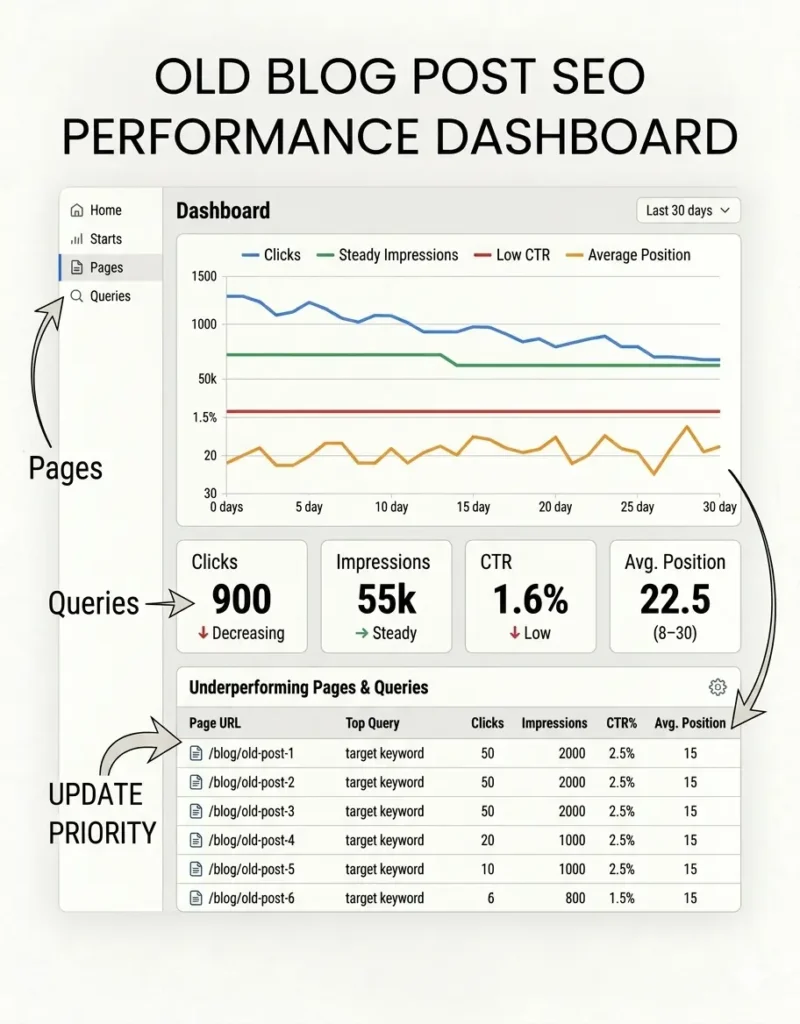
One of the best ways to find old blog posts worth updating is Google Search Console.
Google’s Performance report shows clicks, impressions, CTR, and average position. It also lets you group data by queries and pages, which makes it useful for spotting content refresh opportunities.
Use this workflow:
- Open Google Search Console.
- Go to Performance.
- Select Search results.
- Set the date range to the last 3 months.
- Compare it with the previous 3 months.
- Click the Pages tab.
- Look for blog posts with declining clicks.
- Click one declining URL.
- Open the Queries tab.
- Look for queries with high impressions but low CTR.
- Look for queries ranking between positions 8 and 30.
- Use those queries to improve the article.
For example, if a post gets impressions for how to refresh old blog posts but does not include a step-by-step refresh process, add one.
If a post gets impressions for old blog post SEO checklist but does not include a checklist, add a checklist.
If a post gets impressions for update old content without losing rankings, add a risk-prevention section.
This is how you update based on real search data instead of guessing.
Old Blog Post SEO Checklist: 15 Things to Update
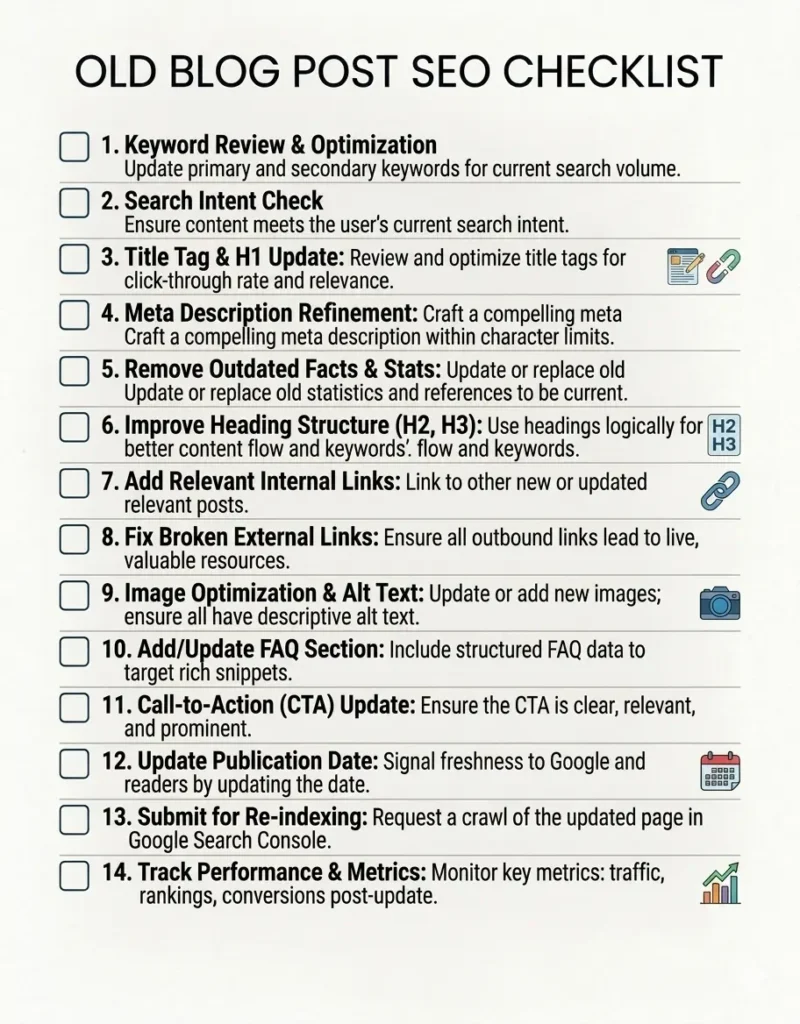
Use this SEO content refresh checklist before republishing any old post.
Download TVS_SEO_Content_Refresh_Checklist. PDF
Download editable TVS_SEO_Content_Refresh_Checklist.DOCS
1. Recheck the Primary Keyword
Before editing, confirm the main keyword still makes sense.
Ask:
- Does this keyword still have search demand?
- Is the keyword too difficult for my website authority?
- Are there lower-difficulty long-tail variations?
- Does the article already rank for related queries?
- Has the search intent changed?
For this article, the primary keyword is how to update old blog posts for SEO. Supporting keywords include refresh old content for SEO, old blog post SEO checklist, content decay, and republish old blog posts.
2. Analyze the Current SERP
Search your target keyword manually and review the top-ranking pages.
Look for:
- Dominant content format
- Common H2s
- FAQ questions
- Use of tables or checklists
- Word count range
- Freshness of examples
- Search intent
- Visuals
- Missing angles
Virayo recommends reviewing top-ranking posts for the target keyword and paying attention to search intent, searcher pain points, content depth, word count, and structure.
Do not copy competitors. Use them to identify what users expect, then make your page more helpful and clearer.
3. Update the Title Tag
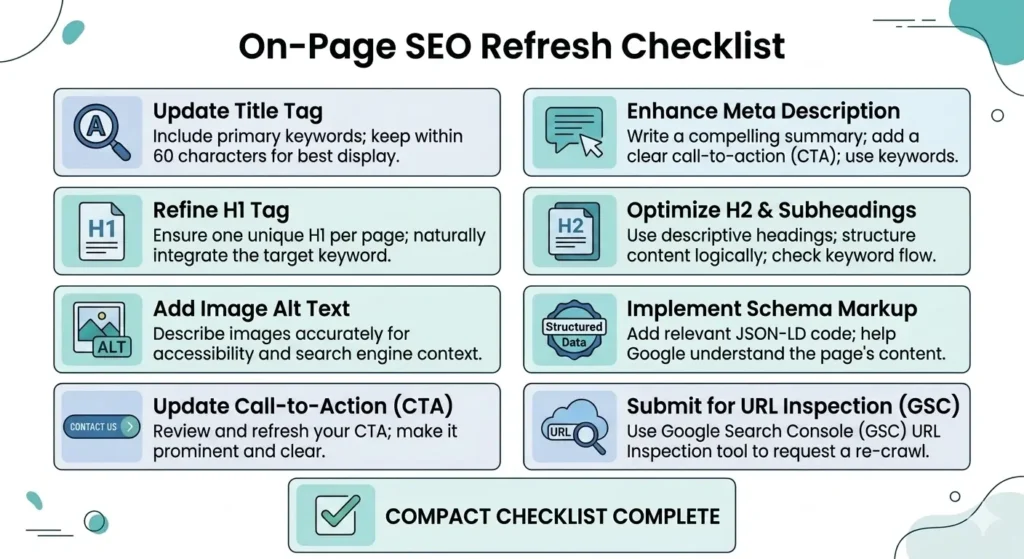
Your title tag should include the primary keyword naturally and give users a reason to click.
Weak title:
“Updating Blog Posts”
Better title:
“How to Update Old Blog Posts for SEO: 15-Step Checklist”
The better version includes the main keyword, promises a clear process, and matches checklist-style search intent.
4. Improve the Meta Description
A strong meta description can improve CTR when it matches the searcher’s problem.
Example:
“Learn how to update old blog posts for SEO with a practical checklist. Find content refresh opportunities, fix outdated pages, protect rankings, and measure results.”
Keep it clear, benefit-driven, and natural.
5. Rewrite the Introduction
Many old blog posts have slow introductions. Replace generic openings with a direct problem and solution.
Do not begin with:
“SEO is very important in today’s digital world.”
Instead, begin with:
“If your old blog posts are losing traffic, you may not need more content. You may need to refresh the pages that already have rankings, impressions, or backlinks.”
This speaks directly to the user’s problem.
6. Update Outdated Information
Replace anything that makes the post look old or unreliable.
Update:
- Statistics
- Screenshots
- Tool names
- Pricing
- Product features
- Broken examples
- Outdated recommendations
- Old year references
- Old screenshots from software dashboards
Outdated content weakens trust. Google’s helpful content guidance asks whether content has easily verified factual errors and whether it provides reliable, complete, and trustworthy information.
7. Add Missing Sections
Compare your article with the current SERP and identify missing sections.
For this topic, important missing sections often include:
- Content decay
- How to use Google Search Console
- Which blog posts to update first
- How to avoid losing rankings
- Refresh vs rewrite vs merge vs redirect
- How often to update content
- How to track results after updating
- AI search visibility
Adding missing sections helps the post satisfy the searcher’s full intent.
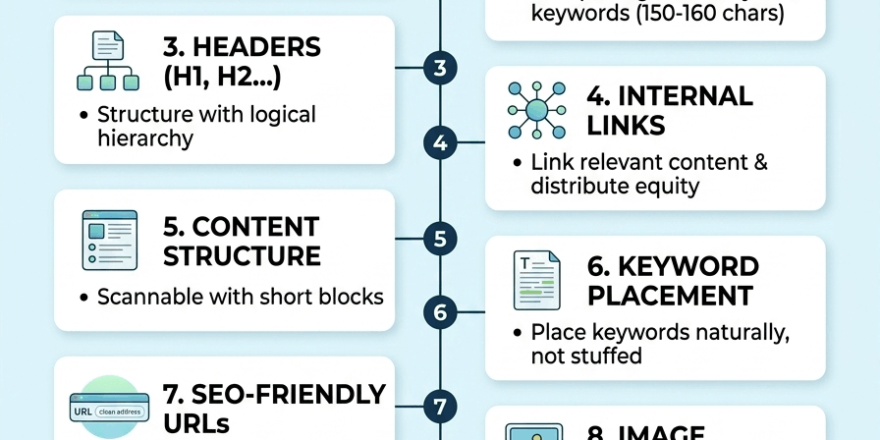
8. Improve Headings
Headings should help readers scan the article and help search engines understand the page.
Use natural keyword variations in headings, such as:
- How to Update Old Blog Posts for SEO
- Old Blog Post SEO Checklist
- How to Refresh Old Content for SEO
- How to Update Old Content Without Losing Rankings
- How Often Should You Update Blog Posts?
Avoid stuffing the same keyword into every heading. Use variations naturally.
9. Add Internal Links
Internal links help users and search engines discover related content.
Add links from the old blog post to newer relevant pages. Also link from newer pages back to the refreshed post.
Use descriptive anchor text, such as:
- content audit checklist
- internal linking strategy
- SEO content refresh checklist
- blog SEO guide
- Google Search Console tutorial
Virayo also highlights links as a key refresh area and recommends checking anchor text, broken links, relevance, and opportunities to link to newer content.
10. Fix External Links
Broken or outdated external links hurt user experience.
Check every external link and ask:
- Does this source still exist?
- Is the information still accurate?
- Is there a better source?
- Is the link still relevant to the section?
- Does the source support the claim?
For SEO topics, official Google documentation is usually a strong source when discussing Search Console, indexing, crawling, and helpful content.
11. Add Better Visuals
Old blog posts often have weak stock images. Replace them with useful visuals.
Good visual ideas include:
- Content decay chart
- Google Search Console workflow screenshot
- Before-and-after blog post example
- Refresh vs rewrite vs merge decision tree
- 15-step SEO content refresh checklist
- 90-day tracking timeline
Visuals can improve readability and make the article more useful.
12. Optimize Image SEO
For each image, use a descriptive file name and alt text.
Example file name:
how-to-update-old-blog-posts-for-seo-checklist.png
Example alt text:
“Checklist showing how to update old blog posts for SEO.”
Use keywords naturally. Do not stuff the same keyword into every image.
13. Add FAQs
FAQs help you answer long-tail queries and People Also Ask-style questions.
Add questions such as:
- How often should you update old blog posts?
- Should I change the URL when updating old blog posts?
- Can updating old content hurt rankings?
- Should I update the publish date?
- How long does it take for a refreshed post to improve?
- Should I delete old blog posts with no traffic?
FAQs are especially useful for low-authority sites because they help you capture specific long-tail searches.
14. Improve the CTA
A refreshed post should not only rank. It should convert.
Depending on your business, add a CTA such as:
- Download the free blog refresh checklist
- Book a content audit
- Read the internal linking guide
- Get the SEO content refresh template
- Subscribe for monthly SEO tips
Yellowball notes that a refresh strategy should connect to performance and enquiries, not just housekeeping.
15. Request Reindexing
After making meaningful updates, request indexing in Google Search Console.
Google says that if you recently added or changed a page, you can request reindexing using the available methods. For individual URLs, use the URL Inspection tool, but repeated requests will not make crawling faster.
Do this after the page is fully updated, not after every small edit.
Let TVS Update Your Blog Content
How to Update Old Content Without Losing Rankings?
Many site owners want to update old content without losing rankings. That is smart because careless editing can hurt performance.
Follow these rules:
- Keep the same URL if possible.
- Do not remove sections that already rank for valuable queries.
- Check Google Search Console before deleting content.
- Preserve the core search intent.
- Keep useful internal links.
- Update facts without changing the page’s topic.
- Do not over-optimize keywords.
- Do not rewrite the page into a completely different article.
- Add a change log if the update is major.
- Track performance after republishing.
Changing the URL can lose link value and reset authority, while keeping the URL helps preserve existing link value.
If the old URL has backlinks, impressions, or rankings, keep it unless there is a very strong reason to change it.
Should You Refresh, Rewrite, Merge, Redirect, or Delete?
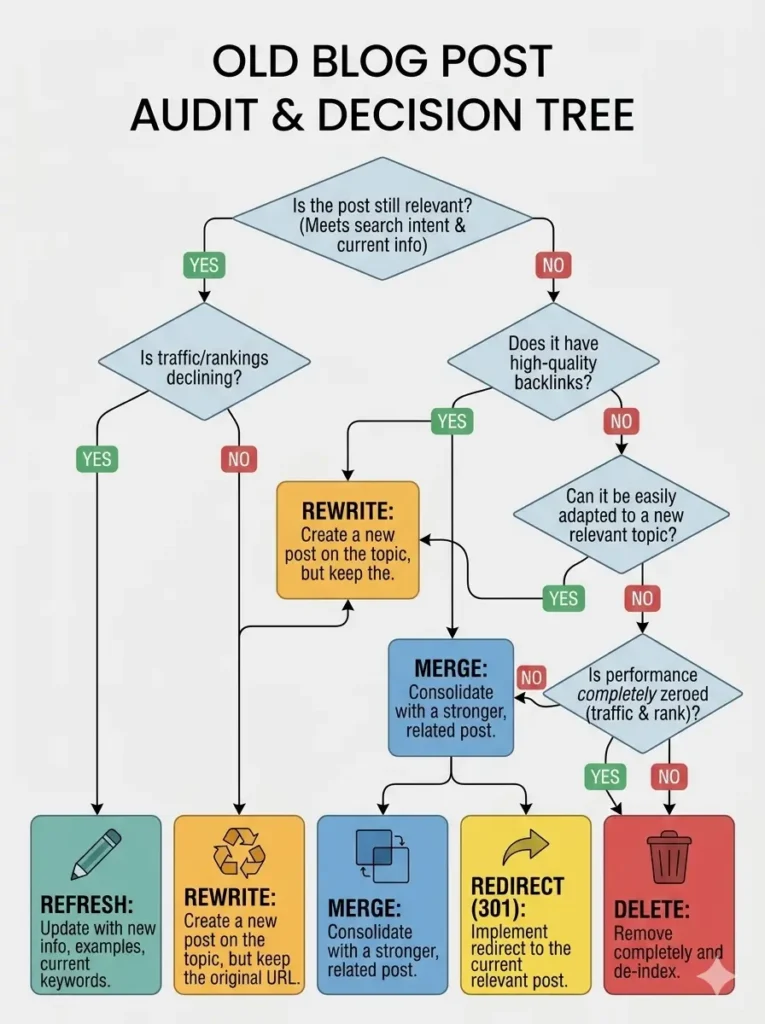
Not every old blog post needs the same treatment.
Use this decision table:
| Situation | Best action |
|---|---|
| The post ranks positions 8–30 and is still relevant | Refresh |
| The post is outdated but has backlinks | Rewrite and preserve URL |
| Two posts target the same keyword | Merge |
| The post has backlinks but no longer fits your site | Redirect |
| The post has no traffic, no links, no impressions, and no relevance | Delete or noindex |
| The post is ranking well but has outdated facts | Light refresh |
| The post targets a keyword that is too competitive | Retarget a long-tail keyword |
This framework helps you avoid wasting time on pages that are unlikely to produce results.
How Often Should You Update Old Blog Posts?
There is no single perfect schedule, but you should review important content regularly.
Use this cadence:
| Content type | Suggested update frequency |
|---|---|
| SEO guides | Every 6–12 months |
| Tool comparisons | Every 3–6 months |
| Statistics posts | Every 3–6 months |
| Product or pricing posts | Monthly or quarterly |
| Evergreen guides | Every 12 months |
| High-traffic posts | Every 3–6 months |
| Low-priority posts | Only when performance drops |
Quarterly content decay audits and flagging pages that have dropped significantly year over year.
The more competitive or fast-changing the topic, the more often you should review it.
How to Republish Old Blog Posts?
After updating the article, republish it carefully.
Use this process:
- Save the old version before editing.
- Make meaningful updates.
- Keep the URL the same if possible.
- Update the title and meta description.
- Add new internal links.
- Check external links.
- Compress and rename images.
- Add FAQs.
- Update the publish or modified date only after substantial changes.
- Request indexing in Google Search Console.
- Promote the updated article.
Do not quietly update the article and hope Google notices. Treat the refresh like a new content launch.
Share it in your newsletter, add it to relevant internal pages, and consider outreach if the old post has backlinks. Contacting people who linked to the original post to let them know the article has been updated, especially if the new version includes fresh research.
What to Track After Updating Old Blog Posts
Do not judge the update after one day. SEO takes time.
Track results in three stages.
After 7 Days
Check:
- Has Google crawled the page?
- Is the updated title showing?
- Are there indexing issues?
- Are internal links working?
After 30 Days
Check:
- Impressions
- Average position
- CTR
- New ranking queries
- Click changes
- Engagement metrics
After 90 Days
Check:
- Organic traffic
- Keyword movement
- Conversions
- Assisted leads or sales
- Backlinks
- Internal link performance
- Whether another refresh is needed
If impressions rise but clicks stay low, improve your title and meta description.
If rankings improve but conversions do not, improve your CTA.
If nothing improves, revisit search intent and competitor gaps.
Final Thoughts
Learning how to update old blog posts for SEO is one of the most practical ways to improve organic performance without publishing more and more new content.
The best updates are not cosmetic. They improve accuracy, usefulness, structure, search intent alignment, internal links, visuals, and trust.
Start with posts that already have impressions, rankings, backlinks, or business value. Use Google Search Console to find real opportunities. Keep URLs stable when possible. Add missing sections. Refresh outdated information. Request reindexing. Then measure results over 30 to 90 days.
A smart SEO content refresh checklist helps you protect what already works and improve what is underperforming.
Ready to Update Your Old Blog Posts for Better SEO?
TVS offers SEO content writing services for blogs, including content refreshes, blog rewrites, keyword optimization, internal linking, and new SEO blog creation. Let our team find your best content opportunities and turn outdated posts into stronger ranking assets.
FAQs
Is it good to update old blog posts for SEO?
Yes. Updating old blog posts can improve relevance, accuracy, user experience, and organic performance, especially when the page already has impressions, backlinks, or rankings.
How do I know which old blog posts to update?
Use Google Search Console to find posts with declining clicks, high impressions, low CTR, or average positions between 8 and 30. These pages often have the best refresh potential.
Should I change the URL when updating an old blog post?
Usually, no. Keep the same URL if the page has backlinks, rankings, or impressions. Change the URL only when absolutely necessary, and use a proper 301 redirect.
How often should I update old blog posts?
Review high-value blog posts every 3–6 months and evergreen posts at least once a year. Fast-changing topics need more frequent updates.
Can updating old content hurt rankings?
Yes, if you remove useful ranking sections, change the search intent, over-optimize keywords, or change the URL without redirects. Always check Search Console data before making major edits.
Should I update the publish date?
Only update the publish date after making meaningful changes. Do not change the date just to make the page look fresh.
How long does it take for updated content to improve?
You may see early movement within a few weeks, but a fair review usually takes 30–90 days. Track clicks, impressions, CTR, average position, and conversions.
What is the difference between refreshing and rewriting?
A refresh improves an existing article while keeping most of its structure and intent. A rewrite is a larger update when the content is outdated, thin, or no longer aligned with the SERP.
Should I delete old blog posts with no traffic?
Only delete old posts if they have no traffic, no backlinks, no impressions, no conversions, and no strategic relevance. If they have backlinks or related value, consider redirecting or merging them instead.