CMS Migration SEO: How to Migrate Your CMS Without Losing Rankings, Traffic or SEO Equity
Moving content from one content management system to another is relatively easy.
Moving it without damaging the search visibility your website has spent years building is the difficult part.
That is where CMS migration SEO comes in.
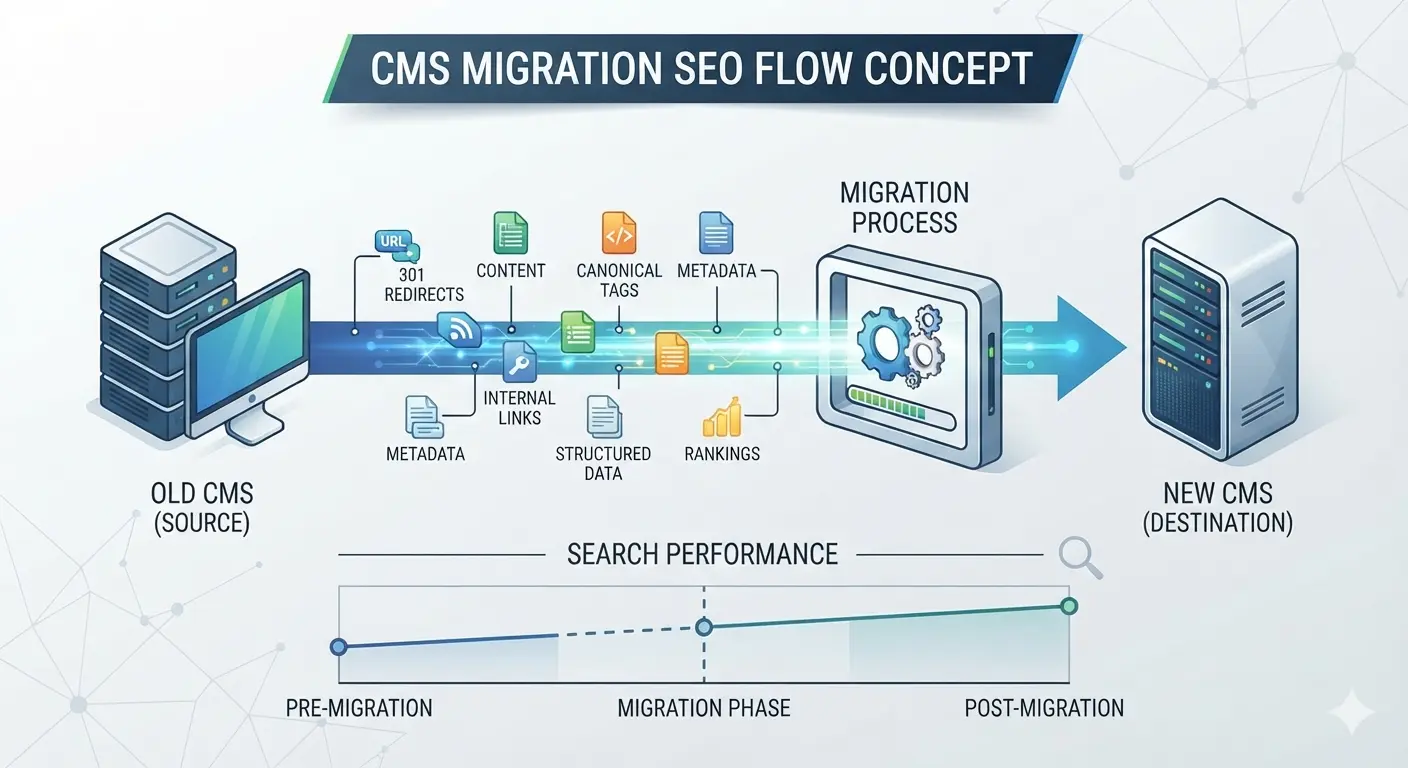
A successful CMS migration must preserve much more than page copy. Your URLs, internal links, metadata, canonical tags, hreflang, structured data, indexation rules, images, redirects, page templates, content relationships and rendering behavior can all affect how search engines understand the new website.
The safest approach is therefore to treat SEO as part of the CMS migration project plan from the beginning, rather than running an SEO audit a few days before launch.
CMS migration SEO at a glance
If you need the short version, protect these elements during a CMS migration:
- Preserve existing URLs wherever doing so makes sense.
- Map every valuable old URL to its most relevant new destination.
- Use permanent server-side redirects when URLs change.
- Retain important titles, headings, metadata and page content.
- Rebuild internal links so they point directly to final URLs.
- Preserve canonical tags, hreflang and structured data.
- Make sure important content remains crawlable and indexable.
- Migrate images, documents and other linked assets properly.
- Validate XML sitemaps, robots.txt and status codes.
- Benchmark rankings, traffic, conversions and indexation before launch.
- Crawl and test the staging website before migration.
- Monitor Search Console, analytics, rankings and server behavior after launch.
A CMS migration becomes substantially safer when each of these items has an owner, acceptance criteria and a validation step.
What Is CMS Migration SEO?
CMS migration SEO is the process of preserving or improving organic-search signals while moving a website from one content management system to another.
Examples include:
- WordPress to Webflow
- Drupal to WordPress
- Adobe Experience Manager to Storyblok
- Sitecore to a headless CMS
- a custom CMS to Webflow Enterprise
- a monolithic CMS to Contentful, Sanity or another headless platform
- an internally developed CMS to a commercial platform
A CMS-to-CMS migration may change only the backend platform, but many migrations also involve a redesign, new URL structure, new frontend framework, different hosting infrastructure, rewritten content or a new domain.
The more elements that change at the same time, the harder it becomes to isolate and correct SEO problems.
For that reason, a content management system migration should be approached as both a technical migration and an SEO migration.
Does CMS Migration Affect SEO?
Yes. A CMS platform migration can affect SEO because the CMS controls or influences many of the signals search engines rely on.
Changing platforms can unintentionally change:
- URL paths
- HTML output
- page titles
- meta descriptions
- heading structure
- canonical URLs
- robots directives
- XML sitemaps
- hreflang
- structured data
- image URLs
- image alt text
- internal linking
- breadcrumbs
- pagination
- taxonomy pages
- JavaScript rendering
- page speed
- Core Web Vitals
- HTTP status codes
A migration does not automatically cause lasting ranking loss. Problems normally occur when valuable signals disappear, pages become inaccessible, URLs are redirected incorrectly, content changes significantly or the new website cannot be crawled and interpreted as efficiently as the old one.
Some temporary ranking fluctuation can occur while search engines recrawl and process a substantial website change.
The objective of a good site migration SEO plan is therefore not to promise that every keyword will remain in exactly the same position on launch day. It is to remove preventable causes of traffic loss and give search engines the clearest possible path from the old website to the new one.
Why CMS Migrations Go Wrong?
Most bad website migration SEO outcomes can be traced to a small number of decisions.
1. SEO joins the project too late
Developers build the new website, content teams migrate pages, design signs everything off—and then somebody asks SEO to review it.
By that point, changing URL architecture, templates or content models can be expensive.
SEO requirements should be documented during discovery.
2. The migration team assumes content is the only thing that needs moving
A CMS content migration is not simply:
Old page → new page.
Each page carries a collection of signals and relationships.
Think instead:
URL + content + metadata + links + media + schema + canonical + language relationships + indexation rules + template behavior → equivalent or improved implementation.
3. URL changes are treated as a launch-day problem
Redirect mapping should be completed before launch.
Waiting until thousands of 404 errors appear in Search Console is not a migration strategy.
4. The redesign and replatforming happen simultaneously without adequate testing
A redesigned website may change:
- navigation
- page copy
- heading hierarchy
- internal links
- page depth
- templates
- content modules
- conversion elements
A new CMS changes another set of variables.
Combining everything creates a much larger diagnostic surface.
5. Staging SEO differs from production SEO
Common examples include:
- noindex remaining active
- production canonical URLs missing
- robots.txt blocking important sections
- test-domain references surviving migration
- JavaScript resources being inaccessible
- schema not appearing in production templates
Your staging environment should therefore be tested against explicit SEO acceptance criteria.
How Do Enterprises Assess CMS Migration Risk and Complexity?
Enterprise CMS migration risk should be assessed before estimating timelines or migration effort.
A useful assessment examines at least eight dimensions.
| Risk factor | Lower complexity | Higher complexity |
|---|---|---|
| URL architecture | URLs remain unchanged | Large-scale URL restructuring |
| Content volume | Hundreds of pages | Hundreds of thousands or millions |
| Content model | Simple pages/posts | Deeply relational structured content |
| Technology | Server-rendered HTML | Complex client-side/headless rendering |
| International SEO | Single market | Multilingual/multi-regional hreflang |
| Domain | Same domain | Domain/subdomain consolidation |
| Integrations | Few integrations | CRM, DAM, ecommerce, personalization, search, APIs |
| Change scope | CMS only | CMS + redesign + domain + content rewrite |
You can turn this into a simple migration risk score.
Low-risk migration
- Same domain
- Mostly identical URLs
- Same content
- Limited templates
- No major rendering changes
Medium-risk migration
- New CMS
- Some URL changes
- New templates
- content restructuring
- new navigation
High-risk migration
- CMS replatforming
- large redesign
- major content consolidation
- headless architecture
- domain change
- multilingual website
- hundreds of thousands of URLs
- substantial taxonomy changes
Very high-risk migration
Several high-risk changes occurring simultaneously.
For a large enterprise, phased migration may be safer than treating the entire website as a single release.
The CMS Migration SEO Plan
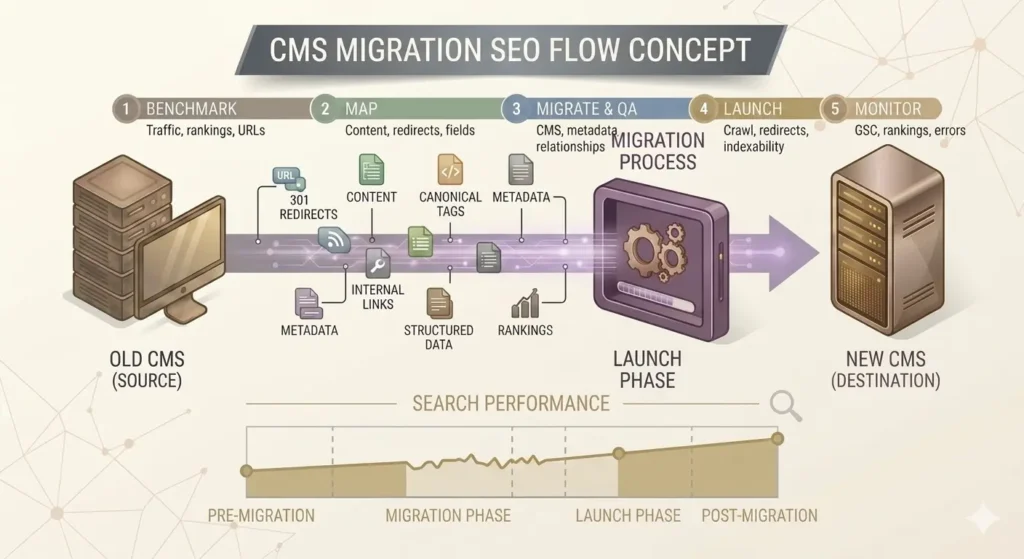
The strongest CMS migration plan separates the project into five stages:
- Discovery and benchmarking
- Architecture and content mapping
- Migration and staging
- Launch
- Post-migration monitoring
Let’s work through each.
Phase 1: Benchmark the Existing Website
You cannot determine whether a migration succeeded if you do not know what performance looked like beforehand.
Create a pre-migration benchmark.
Record organic performance
Export:
- organic sessions
- organic conversions
- landing-page traffic
- impressions
- clicks
- average positions
- branded vs non-branded performance
- traffic by country/device
- revenue or leads from organic search
Use a meaningful comparison period rather than relying on yesterday versus today.
Seasonality matters.
Export Google Search Console data
Preserve data for:
- top queries
- top pages
- indexed pages
- crawl errors
- Core Web Vitals
- enhancements
- manual actions
- external links
Search Console data becomes particularly useful after launch because it helps distinguish ranking problems from crawling or indexing problems.
Crawl the entire website
Your pre-migration crawl creates the SEO inventory for the old CMS.
Record:
- URL
- status code
- title
- meta description
- H1
- canonical
- robots directive
- word/content information
- internal links
- crawl depth
- hreflang
- structured data
- image references
Do not rely exclusively on an XML sitemap.
Sitemaps frequently omit orphan pages, old assets and URLs that search engines still know about.
Identify backlinks
Pages with valuable backlinks deserve special attention.
If a URL has external links but receives little current traffic, deleting it without evaluating its value may still waste link equity.
Phase 2: Build a Complete URL Inventory
The most important document in many SEO migrations is the URL inventory.
Combine URLs discovered from:
- website crawling
- XML sitemaps
- Google Search Console
- analytics
- backlink tools
- CMS database exports
- server logs
- internal search data
- historical URL lists
Then categorize each URL.
Possible actions:
| Existing URL | Migration action |
|---|---|
| Valuable page staying unchanged | Keep URL |
| Valuable page moving | 301/308 to equivalent page |
| Multiple pages being consolidated | Redirect to consolidated replacement |
| Duplicate/obsolete page with no replacement | 404 or 410 where appropriate |
| Valuable asset moving | Redirect asset URL |
| Parameter URL | Evaluate individually |
This URL inventory becomes the foundation of your website migration SEO checklist.
Phase 3: Build the Redirect Map
Whenever possible, keep URLs unchanged.
Changing a CMS does not mean the public URL structure has to change.
If URLs must change, create a one-to-one redirect map from each valuable old URL to the closest relevant new page.
Example:
/services/enterprise-cms-migration
→
/cms-migration-services/
is reasonable if both pages satisfy essentially the same intent.
This is much better than:
/services/enterprise-cms-migration
→
/
Avoid mass home-page redirects
Sending hundreds of deleted URLs to the homepage is rarely useful to users.
A redirect should lead to a page that meaningfully replaces the old resource.
Avoid redirect chains
Do not intentionally create:
Old URL → intermediate URL → previous migration URL → new URL.
Update the redirect so the old URL points directly to the final destination.
Update internal links too
A redirect is not a substitute for clean internal linking.
After migration:
Old internal link → redirect → destination
should become:
New internal link → destination.
This reduces unnecessary hops and gives search engines a cleaner internal graph.
Phase 4: Create the CMS Content Migration Project Plan
The CMS content migration project plan should document more than which pages move.
For every content type, map:
- source content type
- target content type
- source field
- destination field
- taxonomy
- relationships
- author information
- timestamps
- media
- metadata
- SEO fields
- localization
- publishing state
Example:
| Legacy field | New CMS field |
|---|---|
| Page title | Title |
| SEO title | Meta title |
| Summary | Meta description |
| Main copy | Rich text/body |
| Hero image | Featured asset |
| Image alt | Alt text |
| Category | Taxonomy |
| Author ID | Author reference |
| Canonical URL | SEO canonical field |
This is where CMS content migration becomes fundamentally different from copying HTML.
Preserve Content Relationships, Not Just Content
Modern CMS platforms increasingly store content as structured entities rather than isolated pages.
A page might reference:
- authors
- categories
- products
- locations
- case studies
- components
- images
- downloadable assets
If these relationships break, content can remain technically present while becoming incomplete.
A migration tool that preserves references during CMS migration can help, but relationships still need validation after import.
For complex migrations, create stable IDs or lookup tables so references can be rebuilt when destination IDs differ from the source CMS.
Phase 5: Protect On-Page SEO
During the CMS-to-CMS migration, compare old and new pages systematically.
Preserve or intentionally improve:
Page titles
Do not let CMS defaults overwrite optimized titles.
H1 headings
Confirm templates output the correct primary heading.
Meta descriptions
They are not something you want disappearing because the destination CMS uses a different field name.
Main content
Check that migration scripts preserve:
- paragraphs
- lists
- tables
- headings
- links
- embedded media
- captions
Image alt text
Asset migration scripts frequently copy the image but leave accessibility metadata behind.
Internal links
Convert hardcoded legacy URLs to their final destinations.
Breadcrumbs
Make sure breadcrumb links and structured data reflect the new architecture.
Phase 6: Preserve Technical SEO Signals
Your SEO migration checklist should explicitly validate every technical signal generated by the old CMS.
Canonical tags
Each indexable page should normally reference the intended canonical URL.
Look for:
- staging domains
- old domains
- HTTP URLs
- obsolete paths
- canonicals pointing to redirects
- missing canonicals
Robots directives
A classic migration failure occurs when:
<meta name=”robots” content=”noindex”>
is used on staging and accidentally remains after launch.
The same principle applies to robots.txt restrictions.
XML sitemaps
Your production sitemap should contain canonical, indexable URLs on the new website.
Remove:
- redirecting URLs
- 404 pages
- staging URLs
- noncanonical URLs
Structured data
CMS templates often generate structured data automatically.
Changing templates can quietly remove it.
Compare relevant schema before and after the migration, including:
- Organization
- BreadcrumbList
- Article
- Product
- LocalBusiness
- FAQ or other supported types where appropriate
Use structured data because it accurately represents content and supports eligible search features—not because you expect special AI-search treatment.
Hreflang
International sites need particular care.
Validate that:
- language/region codes remain correct
- alternate URLs resolve successfully
- reciprocal annotations remain intact
- canonicals do not conflict with hreflang
- localized pages reference the new URL structure
Phase 7: Handle Media and Documents Properly
CMS migration teams often focus on HTML pages and forget that images and PDFs can have organic visibility and backlinks.
Your content migration plan should cover:
- image URLs
- alt attributes
- image dimensions
- compression
- filenames
- CDN paths
- PDF URLs
- downloadable resources
- video embeds
If valuable asset URLs change, map them as deliberately as normal pages.
Phase 8: Validate JavaScript and Headless CMS SEO
A headless CMS migration adds another layer of risk because the CMS and rendering layer are separated.
The CMS stores content.
Your frontend determines what crawlers and users ultimately receive.
Validate:
- server-side rendering or appropriate rendering strategy
- metadata generation
- canonical tags
- status codes
- hreflang
- structured data
- internal links
- XML sitemap generation
- robots directives
- pagination
- error pages
One dangerous pattern is returning a 200 OK application shell for URLs that should genuinely be 404s.
Search engines need meaningful HTTP behavior as well as visible content.
Phase 9: Create a Staging SEO QA Process
A staging website should be protected from accidental public indexation while still being accessible to your QA team and migration crawler.
Before launch, compare old and new versions.
Crawl both websites
Look for differences in:
- page count
- indexability
- status codes
- titles
- H1s
- canonical tags
- internal links
- crawl depth
- structured data
- hreflang
For enterprise migrations, automate this comparison wherever possible.
Test representative templates
At minimum, test:
- homepage
- category pages
- service/product pages
- blog posts
- author pages
- locations
- pagination
- filtered pages
- search pages
- error pages
Test high-value URLs manually
Prioritize pages that generate:
- the most organic traffic
- the most leads/revenue
- the strongest rankings
- the most backlinks
These are your highest-risk SEO assets.
CMS Migration Launch-Day Checklist
Launch day is not the time to discover that nobody owns redirects.
Use a defined migration website checklist.
Take a final crawl of the old website.
Back up CMS content and migration files.
Deploy production code and database changes.
Remove staging noindex directives from indexable pages.
Confirm robots.txt allows intended crawling.
Activate permanent redirects.
Test priority redirects manually.
Crawl the production website.
Confirm canonical tags use production URLs.
Check titles and H1s.
Validate XML sitemaps.
Submit/update sitemaps in Search Console.
Verify analytics tracking.
Verify conversion tracking.
Check structured data.
Check hreflang.
Test forms and key conversion paths.
Monitor 404/5xx errors.
Check important pages with Search Console URL Inspection.
Confirm CDN and server performance.
For domain migrations, also complete the appropriate Search Console site-move procedures.
Post-Migration SEO Checklist
The migration does not end when the website goes live.
The first days and weeks are when hidden implementation problems become visible.
Monitor indexation
Watch for:
- old URLs remaining indexed unexpectedly
- important new URLs missing
- spikes in excluded pages
- canonical conflicts
- unexpected
noindex - crawl anomalies
Monitor organic landing pages
Do not look only at total organic traffic.
Compare important page groups:
- commercial pages
- blog
- product/category
- locations
- international folders
A problem affecting 20% of the site can be hidden by stable performance elsewhere.
Monitor rankings by page type
Rankings can reveal migration problems before monthly traffic reports make them obvious.
Re-crawl regularly
Compare the new crawl with your pre-migration baseline.
Look for:
- broken links
- redirect chains
- orphan pages
- missing metadata
- unexpected canonical changes
- 404s
- server errors
Monitor backlinks to old URLs
Permanent redirects should handle old external links, but important third-party links may be worth updating directly.
Why Did Our Website Traffic Drop After CMS Migration?
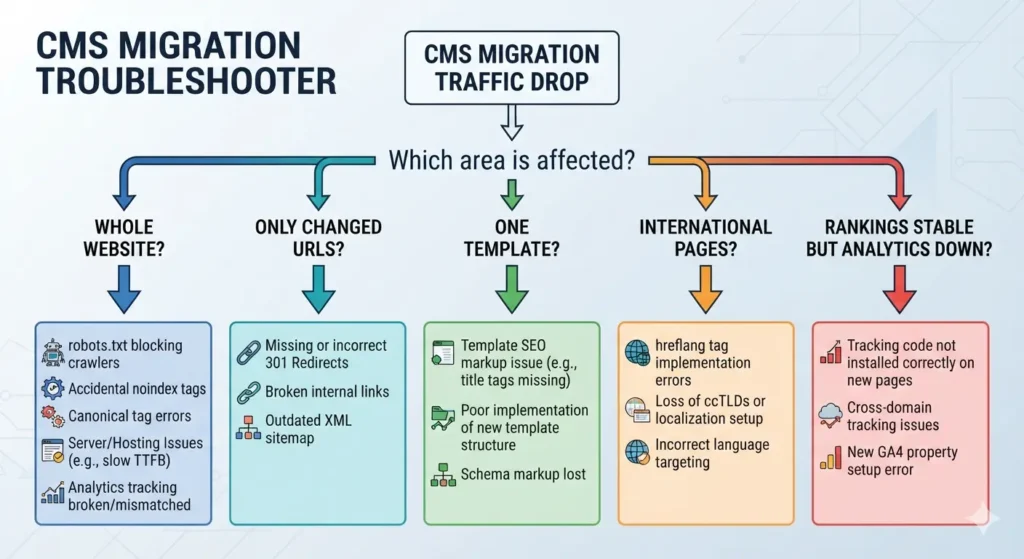
Traffic loss after migration is a symptom, not a diagnosis.
Use the pattern of the decline to find the likely cause.
Traffic dropped immediately across nearly the entire site
Check:
- robots.txt
- noindex
- canonical tags
- server availability
- analytics implementation
- JavaScript rendering
Only pages with changed URLs lost traffic
Check:
- redirect coverage
- redirect destination relevance
- redirect chains
- missing backlinks
- sitemap URLs
- internal links
Only one template type declined
Check the template.
For example, all product pages may have lost:
- H1s
- structured data
- descriptive content
- canonical tags
International traffic declined
Check:
- hreflang
- localization
- international URLs
- country/language navigation
Rankings are stable but traffic reporting collapsed
Before assuming an SEO disaster, verify GA4 or your analytics platform.
Tracking can break during CMS replatforming.
Rankings declined gradually
Investigate:
- content changes
- internal-link changes
- crawl depth
- performance
- duplicate pages
- rendered content
- indexing changes
This diagnostic approach is much more useful than simply asking, “How long will SEO take to recover?”
CMS Migration Checklist for Enterprises
Enterprise websites need additional governance because more teams, systems and dependencies are involved.
Add these items to your standard site migration checklist.
Governance
- Assign an executive sponsor.
- Assign an SEO migration owner.
- Define development ownership.
- Define content ownership.
- Define analytics ownership.
- Establish sign-off criteria.
- Establish rollback procedures.
Technology
- Map CMS integrations.
- Map APIs.
- Map DAM dependencies.
- Map CRM/form integrations.
- Map personalization systems.
- Map onsite search.
- Map authentication/SSO.
- Map CDN and caching behavior.
Content
- Inventory content types.
- Inventory taxonomies.
- Map content relationships.
- Define archival rules.
- Define duplicate-content handling.
- Validate localization.
- Validate media references.
SEO
- Benchmark organic performance.
- Complete URL inventory.
- Approve redirect mapping.
- Preserve technical SEO fields.
- Validate rendering.
- Compare staging crawls.
- Create monitoring dashboards.
- Define post-launch escalation thresholds.
Large CMS migration projects succeed when SEO requirements become formal acceptance criteria rather than informal recommendations.
CMS Migration Tools
There is no single SEO migration tool that handles the entire process.
A practical CMS migration toolkit normally includes several categories.
Crawling tools
Examples:
- Screaming Frog
- Sitebulb
- custom crawlers/scripts
Use them to inventory URLs and compare old versus new sites.
Search performance
Use Google Search Console to monitor:
- indexing
- crawling
- search performance
- page experience
- URL-level issues
Analytics
GA4 or another analytics platform helps establish traffic and conversion benchmarks.
Backlink and visibility platforms
Tools such as Ahrefs or Semrush can help identify valuable URLs, backlinks and ranking changes.
CMS migration tools
Depending on your platform:
- native export/import tools
- APIs
- ETL scripts
- database migrations
- vendor CLI tools
- custom transformation pipelines
Automation helps with scale, but validation still matters.
A migration script can transfer 100,000 records perfectly according to the mapping specification while still producing a website with incorrect canonicals.
CMS Migration Scenario: Migrating From AEM to Storyblok
When you migrate from AEM to Storyblok, think beyond content export.
Adobe Experience Manager implementations often contain:
- components
- content fragments
- experience fragments
- assets
- metadata
- references
- localization
- custom workflows
Storyblok uses a different content-modeling approach.
The SEO challenge is therefore to translate the content architecture without unintentionally changing the public search architecture.
Prioritize:
- mapping AEM content types/components to Storyblok blocks and stories;
- preserving public URL routing;
- migrating asset metadata;
- maintaining internal references;
- reproducing metadata and canonical logic in the frontend;
- validating multilingual relationships;
- testing rendering before launch.
The CMS may change substantially while the URL and search experience remain relatively stable.
That is usually safer than changing every layer simultaneously.
CMS Migration Scenario: Migrating From a Legacy CMS to Webflow Enterprise
When migrating from a legacy CMS to Webflow Enterprise, begin with the old CMS data model.
Document:
- collections/content types
- custom fields
- categories
- references
- dynamic URLs
- metadata
- redirects
- embedded code
- structured data
Then determine how those concepts map into the new Webflow implementation.
Pay particular attention to URL patterns generated by collections.
A platform migration should not automatically become a URL migration simply because the destination CMS prefers a different default structure.
Before launch, crawl all generated collection pages and compare them with the legacy CMS inventory.
SEO Migration for a Custom CMS
A custom CMS SEO migration often requires more discovery than moving between two commercial platforms.
The current system may contain:
- undocumented routing logic
- custom canonical rules
- dynamically generated metadata
- database-driven redirects
- proprietary taxonomies
- legacy APIs
- hardcoded internal links
Do not assume the visible page tells you everything the CMS is doing.
For SEO migration from a custom CMS, document the behavior of the existing system first.
Ask:
- How are URLs generated?
- Where are redirects stored?
- How are canonicals produced?
- Where does structured data come from?
- How are sitemaps generated?
- How are locale relationships handled?
- What happens when content is unpublished?
- What HTTP status codes does the system return?
Recreate the intended behavior—not necessarily the legacy code.
HTTPS Migration SEO Considerations
If CMS migration also involves an HTTP-to-HTTPS move, update:
- canonical URLs
- internal links
- sitemaps
- asset URLs
- hreflang
- structured data URLs
- external integrations
Redirect HTTP URLs directly to their HTTPS equivalents.
Avoid unnecessary sequences such as:
HTTP old URL → HTTPS old URL → HTTPS new URL.
Point legacy URLs directly at the final canonical destination wherever possible.
CMS Migration and Website Redesign: Should You Do Both Together?
Sometimes business constraints make a combined redesign and migration unavoidable.
But from an SEO troubleshooting perspective, fewer simultaneous changes are easier to manage.
If possible:
- keep high-performing content stable;
- preserve proven URLs;
- separate unnecessary content rewrites from infrastructure changes;
- maintain familiar information architecture;
- benchmark every important template.
If a redesign significantly changes content and navigation at the same time as the CMS, your SEO redesign checklist should be integrated with your migration QA—not handled as a separate afterthought.
How to Migrate a Website Without Losing SEO?
No migration partner can credibly guarantee zero ranking movement.
What you can do is remove avoidable risk.
The highest-impact principles are:
- Know what already has SEO value.
- Preserve URLs when practical.
- Map changed URLs precisely.
- Keep important content and search intent intact.
- Rebuild internal relationships correctly.
- Maintain crawlability and indexability.
- Validate technical SEO before launch.
- Monitor aggressively afterward.
That is the foundation of site migration without losing SEO unnecessarily.
CMS Migration SEO and AI Overviews
Optimizing a CMS migration for AI-driven search does not require creating an entirely separate version of SEO.
The fundamentals remain valuable:
- crawlable pages
- clear site architecture
- useful original content
- accurate information
- accessible internal links
- strong page experience
- indexable URLs
- appropriate structured data
During migration, protect the content that demonstrates your expertise rather than reducing useful pages to thin summaries simply because shorter content appears easier for AI systems to process.
Similarly, you do not need dozens of near-identical pages targeting every variation of:
- SEO website migration
- website migration SEO
- SEO site migration
- site migration SEO
- migration SEO checklist
- SEO website migration checklist
One genuinely useful resource can cover the broader entity and intent naturally.
Frequently Asked Questions About CMS Migration SEO
What is CMS migration?
CMS migration is the process of moving a website’s content, data, functionality or publishing workflows from one content management system to another.
It can involve content, templates, media, metadata, databases, integrations, users, workflows and frontend technology.
What is a CMS migration plan?
A CMS migration plan defines the scope, responsibilities, architecture, content mapping, data transfer process, SEO requirements, testing, launch procedure and post-migration monitoring required to move safely between platforms.
What should be included in a content migration plan?
A website content migration plan should define what content moves, what is consolidated or retired, how fields map between platforms, how relationships are preserved, how assets move and how every migrated item will be validated.
Is a CMS migration the same as a website migration?
Not always.
A website migration can involve a domain, protocol, hosting, architecture or design change without changing CMS.
A CMS migration specifically involves changing or substantially replatforming the content management system.
Many projects involve both.
Should URLs change during a CMS migration?
Not unless there is a good reason.
Keeping established URLs can significantly reduce migration complexity.
If URLs need to change, create a comprehensive redirect map before launch.
Should old CMS URLs redirect to the homepage?
Only when the homepage genuinely represents the closest replacement, which is uncommon.
Redirect old pages to the most relevant equivalent destination.
If there is genuinely no replacement, returning an appropriate 404 or 410 response can be better than an irrelevant redirect.
Should we rewrite content during CMS migration?
Rewrite content when there is a clear strategic reason, but understand that simultaneous content and platform changes increase migration complexity.
For high-performing pages, consider migrating them with minimal changes first and improving them after performance stabilizes.
How long should CMS migration redirects remain?
Permanent migration redirects should be treated as long-term infrastructure rather than temporary cleanup.
Avoid removing them simply because the migration happened months ago, especially while old URLs still receive links or traffic.
How can we tell whether a CMS migration was successful?
Compare pre- and post-migration:
- organic traffic
- conversions
- indexed pages
- rankings
- crawling
- Core Web Vitals
- backlink destinations
- error rates
Also confirm technical parity across priority URLs and templates.
Why did our traffic drop after CMS migration?
Common causes include incorrect redirects, missing content, changed internal links, accidental noindex, robots restrictions, canonical errors, rendering problems, lost metadata, analytics errors or major information-architecture changes.
Diagnose the pattern of the loss before changing the site again.
What is the biggest CMS migration SEO mistake?
Treating SEO as a final launch checklist rather than an engineering and content requirement throughout the project.
Final CMS Migration SEO Checklist
Before you approve a migration, answer these questions:
- Do we know every important URL on the current website?
- Do we know which pages generate traffic, revenue and backlinks?
- Have we preserved existing URLs wherever practical?
- Is every changed valuable URL mapped to an appropriate destination?
- Have redirects been tested?
- Has all important content been migrated?
- Have content relationships and references survived?
- Are titles, headings and metadata correct?
- Are canonicals correct?
- Is hreflang correct?
- Is structured data still present and valid?
- Are internal links pointing directly to final URLs?
- Are images and documents working?
- Is the production website crawlable?
- Have staging
noindexrules been removed where required? - Is robots.txt correct?
- Are XML sitemaps clean?
- Does the server return correct status codes?
- Have we tested JavaScript-rendered content?
- Is analytics working?
- Is Search Console configured?
- Have we created post-migration monitoring and escalation procedures?
If you cannot answer all of these confidently, the migration is probably not ready for SEO sign-off.
Need Help With a CMS Migration?
A CMS migration is one of the easiest times to accidentally erase organic-search value—and one of the best opportunities to rebuild your website on a stronger SEO foundation.
TVS provide CMS migration SEO, website migration audits, redirect planning, technical SEO QA and post-migration monitoring for businesses moving between CMS platforms, redesigning websites or replacing legacy and custom systems.
Whether you’re planning a straightforward CMS-to-CMS migration, moving to a headless architecture, migrating from AEM to Storyblok, replacing a custom CMS or moving an enterprise website to Webflow, TVS can help identify the SEO risks before they become traffic losses.
CMS Migration SEO Service by TVS
Protect Your Organic Traffic Before You Migrate
Already have a CMS migration project underway?
TVS can review your:
- current website architecture
- migration scope
- URL strategy
- redirect map
- CMS content migration plan
- staging environment
- technical SEO implementation
- launch checklist
- post-launch performance