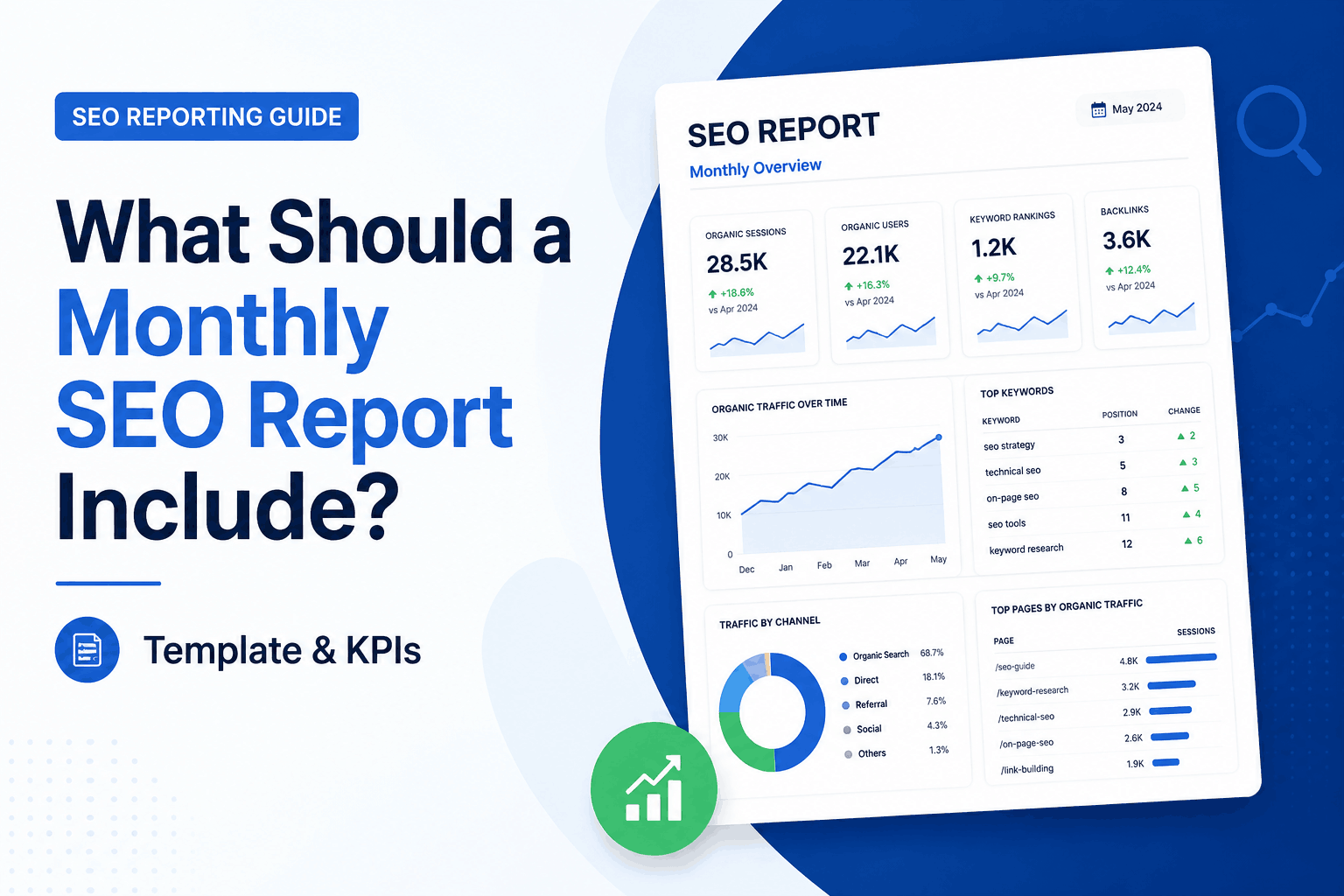
What Should a Monthly SEO Report Include? Template, KPIs and Examples
A monthly SEO report should clearly show how a website performed in organic search, what changed during the month, what SEO work was completed, and what should happen next. It should not be a long document filled with numbers that nobody understands. A good SEO report connects data to real business outcomes, such as leads, sales, calls, enquiries, revenue, and growth in organic visibility.
For clients, managers, business owners, or internal marketing teams, the goal of a monthly SEO report is simple. It should make search performance easy to understand and useful for decision-making.
A strong report answers important questions. Is organic traffic growing? Are rankings improving for valuable keywords? Which pages are bringing results? Are technical issues holding the site back? Did SEO activity lead to more conversions? What should be prioritized next month?
In this guide, you will learn what a monthly SEO report should include, how to structure it, which SEO KPIs matter most, which tools to use, and how to create a report that stakeholders actually want to read.
What Is a Monthly SEO Report?
A monthly SEO report is a recurring performance document that tracks a website’s organic search visibility, traffic quality, keyword movements, technical health, and conversions over a 30-day period. Its primary purpose is to clearly translate raw search metrics into meaningful, actionable strategies that align with broader business revenue goals.
A complete monthly SEO report usually includes organic traffic, keyword rankings, Google Search Console data, top-performing pages, technical SEO health, backlinks, conversions, competitor insights, completed actions, and next-month priorities.
The report should be clear enough for non-SEO readers but detailed enough for SEO specialist to take action. A business owner may only care about leads and revenue, while an SEO manager may want to see crawl issues, indexing problems, ranking movements, and keyword opportunities.
The best SEO reports do not just say what happened. They explain why it happened and what the next step should be.
Why Monthly SEO Reports Matter?
Monthly SEO reports matter because they protect your digital marketing investment by systematically monitoring search engine algorithm updates, identifying competitive threats, and spotting critical technical crawl errors early. They provide essential accountability by directly connecting routine, day-to-day SEO optimization tasks to tangible business outcomes like qualified inbound leads, phone calls, and revenue growth.
SEO is not a one-time task. Search performance changes constantly because of algorithm updates, competitor activity, technical issues, content changes, seasonality, and shifts in user behavior.
A monthly SEO report helps you measure progress, prove the value of SEO work, spot problems early, and keep everyone aligned on strategy. Without regular reporting, SEO can feel unclear. With proper reporting, it becomes measurable and accountable.
Monthly SEO reporting also helps answer business-level questions, such as:
- Is SEO bringing more qualified traffic?
- Are visitors converting into leads or customers?
- Which pages are creating the most value?
- Which keywords are improving?
- Which issues need urgent attention?
- What work was completed this month?
- What should the team focus on next?
This makes the report more than a performance summary. It becomes a planning tool.
Make Smarter Decisions with TVS SEO Reports
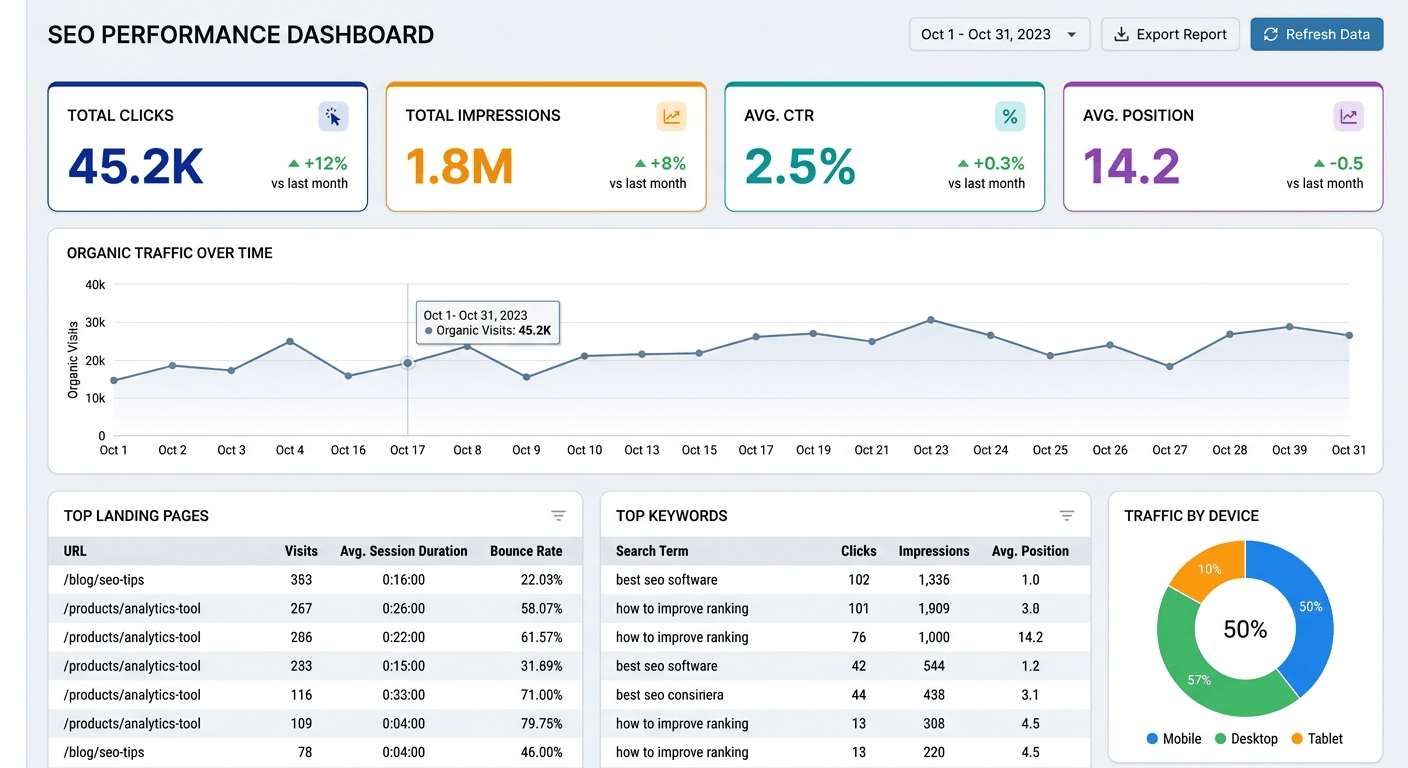
An SEO dashboard and a monthly SEO report are related, but they are not the same thing.
An SEO dashboard shows live or regularly updated data. It is useful for monitoring traffic, rankings, conversions, and technical issues. Tools like Looker Studio, GA4, Google Search Console, AgencyAnalytics, DashThis, Whatagraph, Semrush, and Ahrefs can be used to build SEO dashboards.
A monthly SEO report adds explanation and strategy. It turns the data into a clear story. It explains what changed, why it changed, what was done, what results came from the work, and what should happen next.
| Item | SEO Dashboard | Monthly SEO Report |
|---|---|---|
| Purpose | Monitor performance | Explain performance |
| Format | Live data view | Monthly summary with commentary |
| Best for | Quick checks | Strategy and decision-making |
| Includes | Metrics and charts | Metrics, insights, actions, and next steps |
| Audience | SEO teams and managers | Clients, executives, teams, and business owners |
A dashboard shows the numbers. A monthly SEO report explains what the numbers mean.
What Should a Monthly SEO Report Include?
A strong monthly SEO report should include the following sections.
1. Executive Summary
The executive summary should appear at the beginning of the report. It gives readers a quick understanding of the month’s SEO performance without forcing them to read every chart or table.
This section should answer:
- What happened this month?
- Did organic performance improve or decline?
- What were the biggest wins?
- What were the biggest losses?
- What SEO work was completed?
- What needs attention next?
Keep this section short, clear, and business-focused. Executives and clients may not read the full report, so the summary should include the most important information.
Example Executive Summary
Organic traffic increased by 18% month over month, mainly due to improved rankings for service pages and higher clicks from non-branded search queries. Three priority keywords moved into the top 10, while two blog posts lost visibility and need content updates. Technical crawl errors were reduced, Core Web Vitals remained stable, and organic form submissions increased by 12%. Next month’s focus should be improving CTR on high-impression pages, refreshing underperforming content, and building internal links to key conversion pages.
2. Organic Traffic Overview
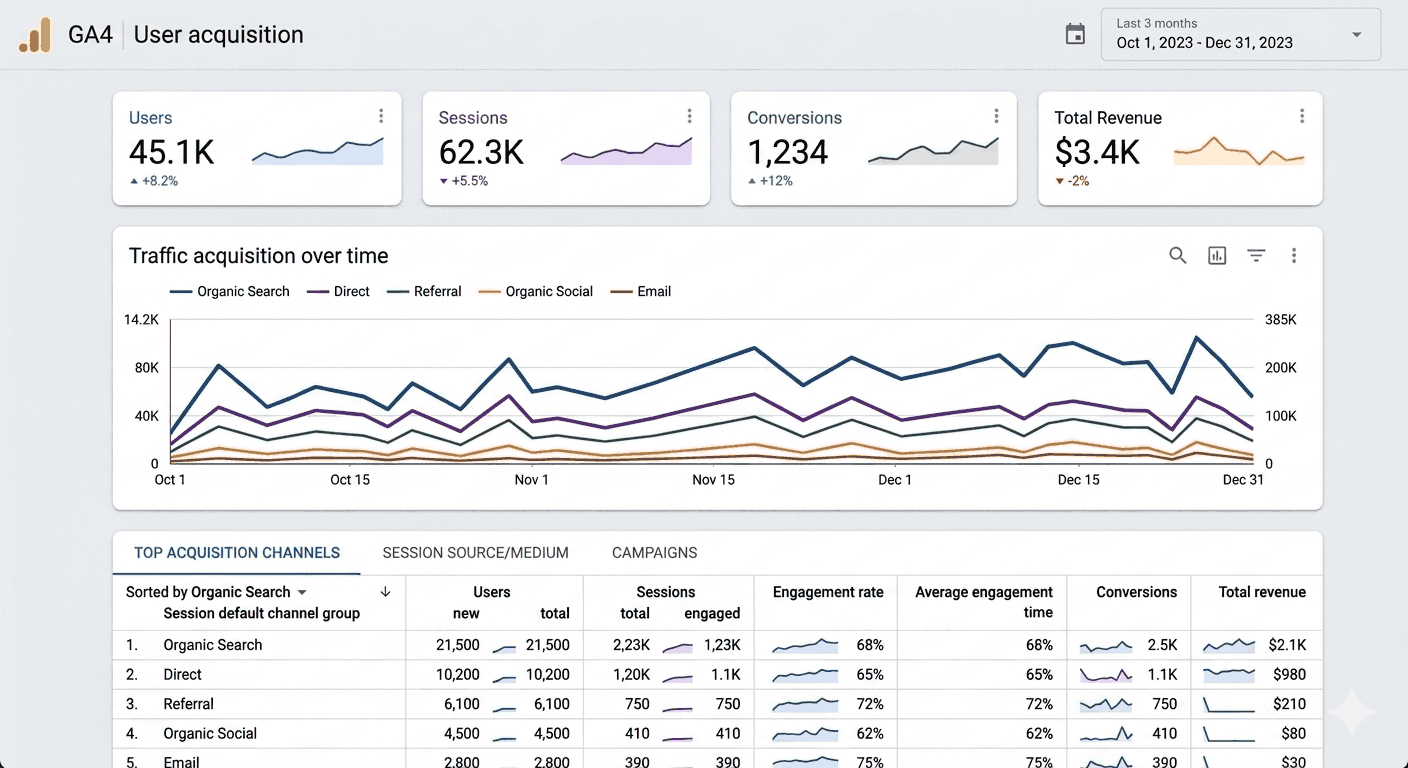
Organic traffic is one of the most important parts of any monthly SEO report. It shows how many visitors came from unpaid search results.
Use tools like Google Analytics 4 to report:
- Organic sessions
- Organic users
- New users from organic search
- Engagement rate
- Average engagement time
- Organic conversions
- Organic revenue, if applicable
Always compare performance month over month and year over year where possible. Month-over-month data shows recent movement. Year-over-year data gives better context, especially for seasonal businesses.
For example, a website may see lower traffic in December compared with November but still perform better than December of the previous year. Without year-over-year comparison, the report may tell an incomplete story.
Also explain the reason behind major changes. If traffic increased because of a new blog post, say that. If traffic dropped because a high-performing page lost rankings, mention it clearly.
3. Google Search Console Performance
Google Search Console data is essential because it shows how the website performs directly in Google Search.
Include these SEO KPIs:
- Clicks
- Impressions
- Click-through rate
- Average position
- Top queries
- Top pages
- Device performance
- Country performance, if relevant
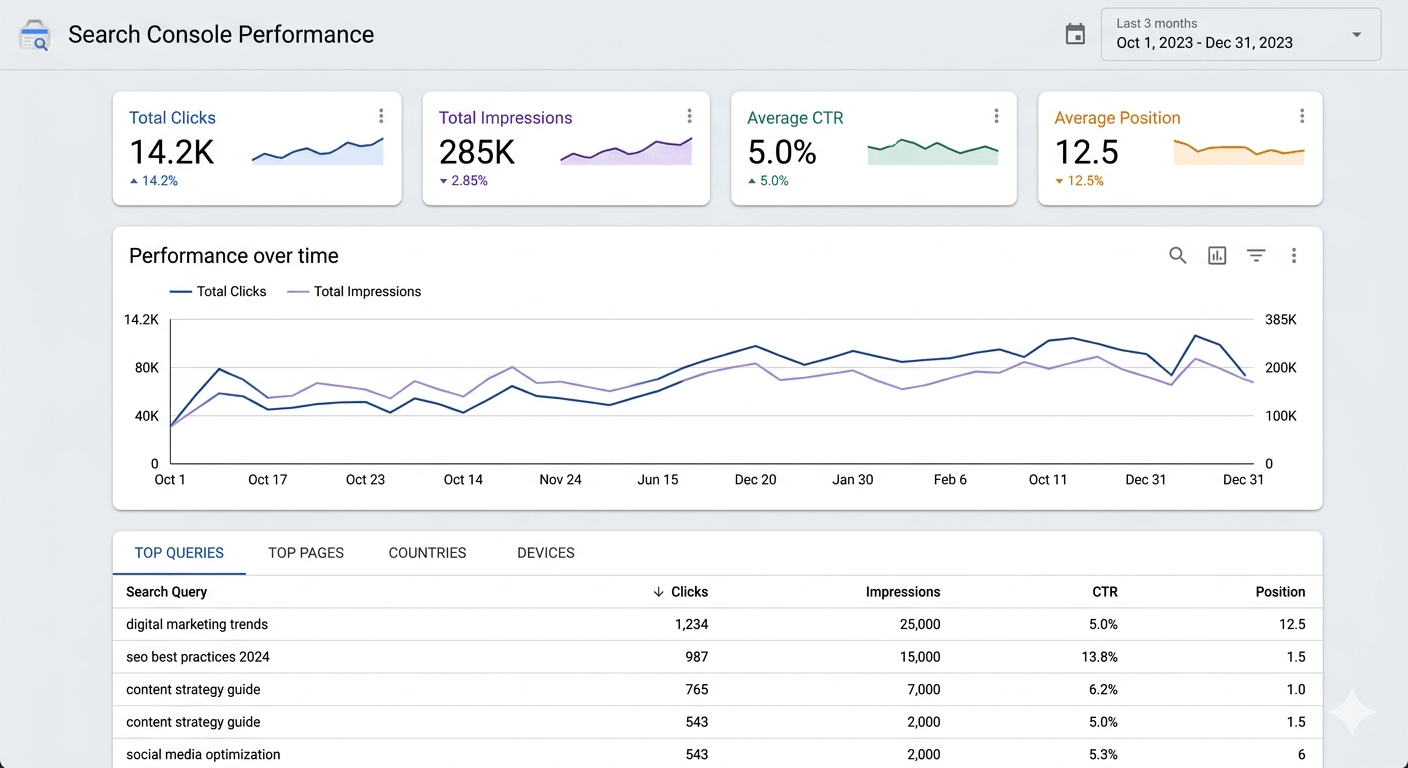
Search Console is especially useful because impressions can increase before traffic does. If impressions are rising but clicks are flat, the page may need better title tags, meta descriptions, or stronger search intent alignment.
Break this section down by page and query. This helps you understand which keywords are gaining visibility and which pages are responsible for growth.
Example insight:
The service page received 32% more impressions this month, but CTR dropped from 4.8% to 3.1%. This suggests the page is appearing more often in search results but the title and meta description may need improvement.
4. Keyword Rankings Summary
Keyword rankings show how target keywords are moving in search results. A monthly SEO report should not include a messy export of every keyword. It should focus on meaningful ranking trends.
Include:
- Total keywords tracked
- Keywords that improved
- Keywords that declined
- Keywords in the top 3
- Keywords in the top 10
- Keywords in the top 20
- Keywords close to page one
- Keywords generating clicks
- New keyword opportunities
Group keywords by topic, intent, location, product, or service. This makes the report easier to read.
Example Keyword Ranking Table
| Keyword | Previous Position | Current Position | Change | Page | Action |
|---|---|---|---|---|---|
| monthly SEO report | 14 | 8 | +6 | Blog guide | Add examples and internal links |
| SEO report template | 21 | 13 | +8 | Blog guide | Improve template section |
| SEO reporting tools | 35 | 28 | +7 | Tools page | Add comparison content |
| client SEO report | 9 | 12 | -3 | Service page | Refresh page copy |
| SEO KPIs | 18 | 15 | +3 | Blog guide | Add KPI table |
This type of table gives context and action. It is much more useful than a long keyword list.
5. Top Performing Pages
The top pages section shows which pages brought the most organic traffic, clicks, conversions, or revenue.
Include:
- Page title or URL
- Organic sessions
- Search Console clicks
- Conversions
- Conversion rate
- Keyword rankings
- Month-over-month change
- Year-over-year change, if possible
This section helps identify what type of content is working best. It also shows where more SEO effort should be invested.
For example, if a service page has lower traffic but a high conversion rate, it may deserve more internal links and keyword optimization. If a blog post gets high traffic but no conversions, it may need stronger calls to action or better links to commercial /service pages.
This section should answer:
- Which pages are driving traffic?
- Which pages are generating leads?
- Which pages are losing visibility?
- Which pages need updating?
- Which pages deserve more internal links?
6. Content Updates and Publishing Activity
Content activity should always be included in a monthly SEO report. This helps connect SEO work with results.
List the content work completed during the month, such as:
New blog posts
- published
- Service pages created
- Landing pages updated
- Old blog posts refreshed
- Internal links added
- Content consolidated
- Thin content removed
- Meta titles and descriptions improved
- FAQs added
- Schema added to content
This section is important because stakeholders need to see that SEO involves active work. It also helps show which actions may have contributed to ranking, traffic, or conversion changes.
Example:
Three older blog posts were updated with new statistics, better headings, internal links, and improved meta descriptions. One refreshed post improved from position 16 to position 9 and generated 22% more organic clicks.
7. Technical SEO Health
Technical SEO issues can quietly reduce search visibility. A monthly SEO report should include a technical health section that shows whether search engines can crawl, index, and understand the website properly.
Include:
- Crawl errors
- Indexing issues
- Broken links
- Redirect problems
- Canonical issues
- Sitemap status
- Robots.txt problems
- Page speed
- Core Web Vitals
- Mobile usability
- Structured data errors
- Duplicate content
- 404 pages
- Server errors
Use a simple status system so readers can quickly understand what needs attention.
| Issue | Status | Impact | Recommended Action |
|---|---|---|---|
| 12 pages not indexed | Needs attention | Medium | Review indexability and internal links |
| 8 broken internal links | In progress | Low | Replace or redirect broken URLs |
| Product schema errors | Needs attention | High | Fix missing required fields |
| Core Web Vitals stable | Resolved | Low | Continue monitoring |
| XML sitemap submitted | Resolved | Medium | Monitor indexed URLs |
This makes technical SEO reporting more actionable.
8. Backlink and Authority Overview
Backlinks are still an important part of SEO, especially for competitive keywords. If link building, digital PR, or authority building is part of your SEO strategy, include a backlink section in the report.
Include:
- New referring domains
- New backlinks
- Lost backlinks
- Highest-quality links gained
- Spammy or low-quality links found
- Anchor text trends
- Competitor backlink growth
- Domain authority or similar third-party metrics
Do not focus only on the number of backlinks. Quality matters more than quantity. A few relevant links from trusted websites can be more valuable than hundreds of weak links.
Example insight:
The website gained four new referring domains this month, including one industry-relevant link to a service page. Two low-quality links were detected, but they do not currently require action. Competitors gained more links to comparison-style content, which suggests an opportunity to create stronger link-worthy resources.
9. Conversion and Business Impact
A monthly SEO report should not stop at rankings and traffic. The most useful reports connect SEO performance to business results.
Include:
- Organic leads
- Form submissions
- Phone calls
- Demo requests
- Purchases
- Revenue from organic search
- Quote requests
- Newsletter signups
- Conversion rate
- Assisted conversions, if available
This is one of the most important sections because it proves the business value of SEO.
If organic traffic increased but conversions dropped, that should be explained. It may mean the website attracted less qualified traffic, or the landing page experience needs improvement.
Example insight:
Organic sessions increased by 15%, but organic leads decreased by 6%. The drop came mainly from mobile users on two service pages. These pages should be reviewed for page speed, form usability, CTA placement, and search intent match.
10. Competitor Insights
A useful SEO performance report should include a short competitor snapshot. This does not need to be long, but it should show where competitors are gaining visibility and where your site has opportunities.
Track:
- Competitor ranking changes
- Keyword gaps
- Content gaps
- Backlink gains
- SERP feature ownership
- Featured snippet opportunities
- AI Overview visibility, if relevant
- New content published by competitors
This section helps explain why rankings may change even when your own website has not changed. Sometimes rankings drop because a competitor improved their content, gained backlinks, or matched search intent better.
Example insight:
Two competitors improved rankings for commercial keywords by adding comparison tables, FAQs, and stronger internal links. Our target page covers the topic but lacks a detailed buying guide section. Adding a comparison table and clearer bottom-funnel CTA may help close the gap.
11. SEO Actions Completed This Month
This section is often overlooked, but it is one of the most valuable parts of a client SEO report. It shows the actual work completed during the month.
Include completed actions such as:
- Technical fixes
- Content updates
- Keyword research
- Internal linking improvements
- Schema implementation
- Page speed improvements
- Backlink outreach
- Meta title rewrites
- Content briefs created
- Competitor research
- SEO audits completed
This section helps stakeholders understand that SEO is active work, not just monthly reporting.
Example:
This month, we updated five service pages, added 42 internal links, fixed 18 broken links, improved title tags on 12 pages, created two new content briefs, and resolved sitemap errors in Google Search Console.
12. Priorities and Next Steps
Every monthly SEO report should end with a clear action plan. A report without next steps is only a summary. A report with priorities becomes a strategy document.
Include:
- Top priorities for next month
- Issues that need approval
- Pages that need updating
- Technical fixes to complete
- Content to publish
- Keywords to target
- Risks to monitor
- Expected impact
Example Next Steps Table
| Priority | Task | Reason | Expected Impact |
|---|---|---|---|
| High | Update 3 underperforming service pages | Rankings declined for commercial terms | Improve conversions and keyword positions |
| High | Fix indexing issues on 12 URLs | Pages are not appearing in Google | Recover lost visibility |
| Medium | Improve CTR on high-impression pages | Impressions increased but clicks are flat | Increase organic traffic |
| Medium | Add internal links to conversion pages | Important pages lack link equity | Improve ranking potential |
| Low | Review lost backlinks | Some links dropped this month | Protect authority |
This gives the team a clear direction for the next month.
Get Your Monthly SEO Report Today
Monthly SEO Report Template
Here is a simple monthly SEO report template you can use for clients, agencies, freelancers, or internal teams.
| Report Section | Metrics to Include | Recommended Tool | Why It Matters |
|---|---|---|---|
| Executive Summary | Wins, losses, completed work, priorities | Manual commentary | Gives a quick overview |
| Organic Traffic | Sessions, users, engagement, conversions | GA4 | Measures search traffic quality |
| Search Visibility | Clicks, impressions, CTR, position | Google Search Console | Shows Google performance |
| Keyword Rankings | Top 3, top 10, improved, declined keywords | Semrush, Ahrefs, SE Ranking | Tracks ranking movement |
| Top Pages | Traffic, clicks, conversions, ranking changes | GA4 and GSC | Identifies valuable content |
| Content Activity | Published, updated, refreshed, removed pages | CMS and project tracker | Connects work to results |
| Technical SEO | Indexing, crawl errors, CWV, schema, broken links | GSC, Screaming Frog | Finds visibility issues |
| Backlinks | New links, lost links, referring domains | Ahrefs, Semrush, Moz | Measures authority growth |
| Conversions | Leads, calls, sales, revenue, forms | GA4, CRM, call tracking | Proves business impact |
| Competitors | Keyword gaps, content gaps, link gaps | Ahrefs, Semrush, Similarweb | Finds opportunities |
| Completed Work | Fixes, updates, outreach, audits | Project management tool | Shows SEO activity |
| Next Steps | Priorities, risks, recommendations | Manual commentary | Turns reporting into strategy |
Download editable monthly seo report template: monthly-seo-report-template
Best Tools to Build a Monthly SEO Report
The right tools depend on the size of the website, the client, the budget, and the depth of reporting needed.
Useful SEO reporting tools include:
- Google Analytics 4 for organic traffic, engagement, events, conversions, and revenue.
- Google Search Console for clicks, impressions, CTR, indexing, and search queries.
- Looker Studio for building SEO dashboards and visual reports.
- Semrush for keyword tracking, competitor analysis, backlinks, and site audits.
- Ahrefs for backlink analysis, keyword research, content gaps, and competitor insights.
- Screaming Frog for technical SEO audits, crawl data, metadata, canonicals, and broken links.
- AgencyAnalytics for client SEO dashboards and automated reporting.
- DashThis for marketing dashboards and SEO report templates.
- Whatagraph for visual reports across multiple marketing channels.
- SE Ranking for rank tracking, audits, and competitor monitoring.
- Moz Pro for domain authority, keyword tracking, and link insights.
You do not need to use every tool. For many businesses, GA4, Google Search Console, Looker Studio, and one SEO platform like Ahrefs or Semrush are enough.
What to Include Based on the Audience
Not every monthly SEO report should look the same. The best report is tailored to the person reading it.
| Audience | What They Care About Most | What to Include |
|---|---|---|
| Business owner | Leads, calls, revenue, ROI | Summary, conversions, top pages, next steps |
| Marketing manager | Growth and campaign performance | Traffic, rankings, content results, competitors |
| SEO specialist | Technical and ranking details | Crawl issues, indexing, schema, keyword groups |
| Executive team | Business impact | Summary, revenue, risks, priorities |
| eCommerce team | Sales and product visibility | Revenue, product pages, category rankings |
| Local business | Calls and map visibility | Local rankings, GBP actions, calls, directions |
| Agency client | Work completed and results | Actions, KPIs, wins, next-month plan |
This makes the SEO report more useful and avoids overwhelming people with data they do not need.
What Not to Include in a Monthly SEO Report
A monthly SEO report should be focused. Too much unnecessary data can make the report harder to understand.
Avoid including:
- Huge keyword exports with no explanation
- Screenshots without commentary
- Vanity metrics that do not support decisions
- Social media metrics unless they connect to SEO goals
- Raw traffic numbers without context
- Technical data that has no clear action
- Backlink counts without link quality
- Metrics that the audience does not understand
- Repeated data from previous reports with no update
For example, total impressions may look impressive, but they are not useful unless you explain whether those impressions came from valuable keywords, branded searches, or irrelevant queries.
The rule is simple. If a metric does not help explain performance or guide action, it probably does not need to be in the report.
Best Practices for a Strong Monthly SEO Report
A strong monthly SEO report should be clear, honest, and useful. Follow these best practices.
Keep It Simple
Do not overwhelm readers with too many numbers. Focus on the SEO KPIs that connect to goals.
Compare Time Periods
Use month-over-month and year-over-year comparisons. This gives better context and helps avoid misleading conclusions.
Add Commentary
Do not just show data. Explain what changed, why it changed, and what it means.
Highlight Wins and Losses
A good report is honest. Show progress, but also explain setbacks and risks.
Connect SEO to Business Goals
Traffic matters, but leads, sales, revenue, and qualified enquiries matter more.
Use Visuals
Charts, tables, and simple status labels make trends easier to understand.
Make It Actionable
Every report should include recommendations and priorities for the next month.
Monthly SEO Report Example Structure
Here is a clean structure you can follow:
- Executive Summary
- Organic Traffic Performance
- Google Search Console Insights
- Keyword Rankings Summary
- Top Performing Pages
- Content Published and Updated
- Technical SEO Findings
- Backlinks and Authority
- Conversions and Revenue
- Competitor Insights
- SEO Actions Completed
- Priorities for Next Month
This format works well for agencies, in-house teams, freelancers, and business owners.
Final Thoughts
A monthly SEO report should be clear, strategic, and focused on outcomes. It should show more than rankings and traffic. It should explain progress, reveal issues, connect SEO work to business results, and guide the next month’s SEO plan.
The best SEO reports combine data with context. They show what happened, why it happened, what was completed, and what should happen next.
If your report includes organic traffic, keyword rankings, Google Search Console data, technical SEO health, backlinks, content updates, conversions, competitor insights, completed actions, and next steps, you will have a report that is useful, professional, and easy to act on.
A monthly SEO report should not only summarize the past. It should help shape the next stage of growth.
Track Your SEO Growth with TVS Monthly Reports
FAQ: Monthly SEO Report
What is the purpose of a monthly SEO report?
The purpose of a monthly SEO report is to track organic search performance, explain ranking and traffic changes, show completed SEO work, and guide future strategy.
What should a monthly SEO report include?
A monthly SEO report should include an executive summary, organic traffic, keyword rankings, Google Search Console data, top pages, content updates, technical SEO issues, backlinks, conversions, competitor insights, completed actions, and next steps.
How long should a monthly SEO report be?
Most monthly SEO reports are 3 to 10 pages, depending on the audience. A simple dashboard with clear commentary may also work for smaller businesses.
What are the most important SEO KPIs to report?
Important SEO KPIs include organic sessions, clicks, impressions, CTR, keyword rankings, conversions, revenue, top pages, backlinks, indexing status, and technical SEO health.
Which tools are best for monthly SEO reporting?
Useful tools include Google Analytics 4, Google Search Console, Looker Studio, Semrush, Ahrefs, Screaming Frog, AgencyAnalytics, DashThis, Whatagraph, SE Ranking, and Moz Pro.
Should a monthly SEO report include conversions?
Yes. Conversions are one of the most important parts of SEO reporting because they connect organic search performance to business results like leads, sales, calls, and revenue.
What is the difference between an SEO dashboard and an SEO report?
An SEO dashboard shows live or regularly updated data, while an SEO report explains what the data means, why performance changed, and what actions should happen next.
How often should SEO reports be delivered?
SEO reports are usually delivered monthly. Weekly dashboards can be useful for monitoring, but monthly reports are better for strategy, performance review, and planning.